> For the complete documentation index, see [llms.txt](https://docs.ilert.com/llms.txt). Markdown versions of documentation pages are available by appending `.md` to page URLs; this page is available as [Markdown](https://docs.ilert.com/ai-and-agents/agents/sre-agent/alert-triage.md).

# Alert triage

Ask your agent to cluster similar open alerts, so duplicates collapse into one parent alert instead of filling the list.

When many alerts fire for the same underlying problem, your alert list becomes hard to read. **Alert triage** lets you ask your agent to group similar open alerts into clusters, so you can collapse the duplicates into one parent alert, hand a cluster to an investigation, or declare an incident for it.

Triage is about **grouping**, not root cause. It tells you *these alerts belong together* — it does not analyze why they fired. For that, use a root cause analysis.

{% content-ref url="/pages/gZKiwMVgY05ARI2wHmrW" %}
[AI SRE](/ai-and-agents/agents/sre-agent.md)
{% endcontent-ref %}

#### Start a triage

Triage runs on request in a chat with the agent. There is no button and no automatic trigger.

{% stepper %}
{% step %}
Open a chat with your agent
{% endstep %}

{% step %}
@mention the agent and ask it to triage, for example:

* "triage my alerts"
* "cluster my open alerts"

You can add a time range in plain language, e.g. "triage my open alerts from the last 6 hours".
{% endstep %}

{% step %}
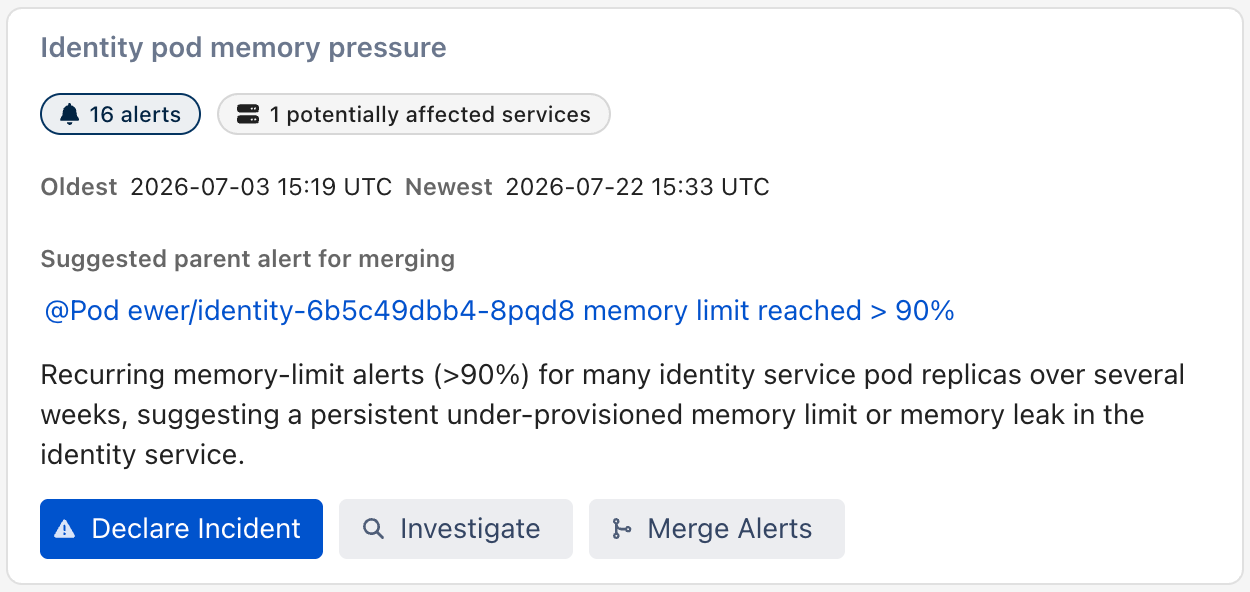
The agent fetches the matching alerts, groups them, and posts one card per cluster in the chat

<figure><img src="https://3394882078-files.gitbook.io/~/files/v0/b/gitbook-x-prod.appspot.com/o/spaces%2F-M76ygPnS4HUcFSX8ulm%2Fuploads%2Fgit-blob-9e3ed27d93b893d9e5f345f74ff544324d1aa899%2Fsre-agent-triage-clusters-chat.png?alt=media" alt=""><figcaption></figcaption></figure>
{% endstep %}
{% endstepper %}

#### What gets triaged

* **Open alerts by default** — alerts in `PENDING` and `ACCEPTED` state. Ask for other states explicitly if you need them.
* **A time range if you give one**, otherwise all matching open alerts.
* **Only alerts you can see.** Triage runs with your own visibility, so neither a team-scoped agent nor a user without access to a team ever sees that team's alerts.

If the request matches **more than 100 alerts**, the agent stops and asks you to either confirm triaging the 100 most recent ones or adjust the time range.

#### What you get back

One card per cluster, containing:

* A short **caption** naming what the cluster has in common, and a one-sentence description
* The **number of alerts** in the cluster — click it to open them
* The **oldest** and **newest** alert timestamps in the cluster
* The **affected services**, plus services the agent considers potentially affected
* The **suggested parent alert for merging** — the oldest alert in the cluster

Below the clusters you get a **Distinct alerts** card listing the alerts the agent deliberately did *not* group.

#### Actions on a cluster

Each card carries up to three buttons. They are independent — using one leaves the others available on the same card.

<table><thead><tr><th width="203.7734375">Action</th><th>What it does</th></tr></thead><tbody><tr><td><strong>Merge Alerts</strong></td><td>Merges every other alert in the cluster into the suggested parent alert. The child alerts stop appearing separately in your alert list.</td></tr><tr><td><strong>Investigate</strong></td><td>Hands the cluster's alerts and services to a root cause investigation.</td></tr><tr><td><strong>Declare Incident</strong></td><td>Declares an operational incident titled from the cluster caption, with the cluster's description as the summary, all its alerts linked, and its affected services set to <strong>degraded</strong>. When the incident is created, the button turns into a link to it.</td></tr></tbody></table>

Buttons you cannot use are hidden rather than shown as failing: **Investigate** does not appear if investigations are unavailable for the agent, and **Declare Incident** requires your own permission to declare incidents.

{% hint style="warning" %}
**Merge Alerts** and **Declare Incident** change data in your account. Only the buttons on the card trigger them — the agent never merges alerts or declares incidents on its own.
{% endhint %}

#### Limits

* Up to **100 alerts** per run without confirmation; on confirmation the 100 most recent matching alerts are triaged.
* A single **Merge Alerts** action can merge at most **40 child alerts** into the parent, so a cluster of more than 41 alerts cannot be merged in one click.
* Results are kept for **24 hours**. Running triage again over an overlapping window reuses the clusters it already established and tells you how many groups are new, instead of regrouping everything from scratch.


---

# Agent Instructions
This documentation is published with GitBook. GitBook is the documentation platform designed so that both humans and AI agents can read, navigate, and reason over technical content effectively. Learn more at gitbook.com.

## Querying This Documentation
If you need additional information that is not directly available in this page, you can query the documentation by asking a question.

Perform an HTTP GET request on the following URL with the `ask` and `goal` query parameters:

```
GET https://docs.ilert.com/ai-and-agents/agents/sre-agent/alert-triage.md?ask=<question>&goal=<user_goal>
```

`ask` is the immediate question: it should be specific, self-contained, and written in natural language.
`goal` is what the user is ultimately trying to achieve, the reason they need the answer. Sharing it helps GitBook give you a better, more relevant answer. A goal is most helpful when it describes the outcome the user wants rather than restating the question. For example, with `ask=how do I create an API token`, a goal like `automate deployments from our CI pipeline` lets GitBook tailor the answer to that use case.

The response will contain a direct answer to the question and relevant excerpts and sources from the documentation.

Use this mechanism when the answer is not explicitly present in the current page, you need clarification or additional context, or you want to retrieve related documentation sections.
