> For the complete documentation index, see [llms.txt](https://docs.ilert.com/llms.txt). Markdown versions of documentation pages are available by appending `.md` to page URLs; this page is available as [Markdown](https://docs.ilert.com/alerting/configure-alerting/event-flows.md).
# Event flows
A routing layer in front of your alert sources: branch on the payload, wait for business hours, and send each event to the source that suits it.
An alert source decides what an event means. An event flow decides **which alert source gets it** — and that turns out to be the thing you need once one endpoint has to serve several teams, several severities, or different behaviour during the night.
Your tool sends to the flow instead of to a source. The flow evaluates the payload, follows the first branch that matches, and routes the event onward.
{% hint style="info" %}
**Event flows require the** [**Scale plan**](https://www.ilert.com/pricing) **or higher, and are in beta.**
Beta here means the node set is still growing and one node — **Transform event** — is in closed beta on top of that. Flows you build now keep working; expect new blocks rather than changed ones.
{% endhint %}
## When to reach for one
You do not need an event flow to control noise — the [alert source](/alerting/configure-alerting/alert-sources.md) does that, with filters, grouping and priority. Reach for a flow when the *destination* has to change:
* One Prometheus endpoint, but database alerts should page the database team and everything else the platform team.
* Anything arriving outside business hours should go to a low-priority source instead of the on-call one.
* An event should be held for ten minutes in case it resolves itself, and only then routed.
If the routing decision is always the same, put the logic on the alert source and skip the flow.
## Build a flow
{% stepper %}
{% step %}
### Create it
In the sidebar, go to **Alerting** → **Event flows** and click **Create new event flow**. Give it a name, and optionally assign [teams](/users-and-access-management/teams.md).
{% endstep %}
{% step %}
### Say what triggers it
Click the **Incoming event** node and pick one or more integrations. ilert generates an endpoint and integration key per integration — point your tool at those instead of at an alert source's. They are drop-in replacements, so switching an existing tool over is a URL change.
{% endstep %}
{% step %}
### Add logic
Click a **+** on the canvas and choose a node. Most flows are a **Branch** or a **Support hours** node followed by a **Route to alert source** on each path.
{% endstep %}
{% step %}
### Save
Click **Save**. The flow is live immediately and starts processing events from the integrations you attached.
{% endstep %}
{% endstepper %}
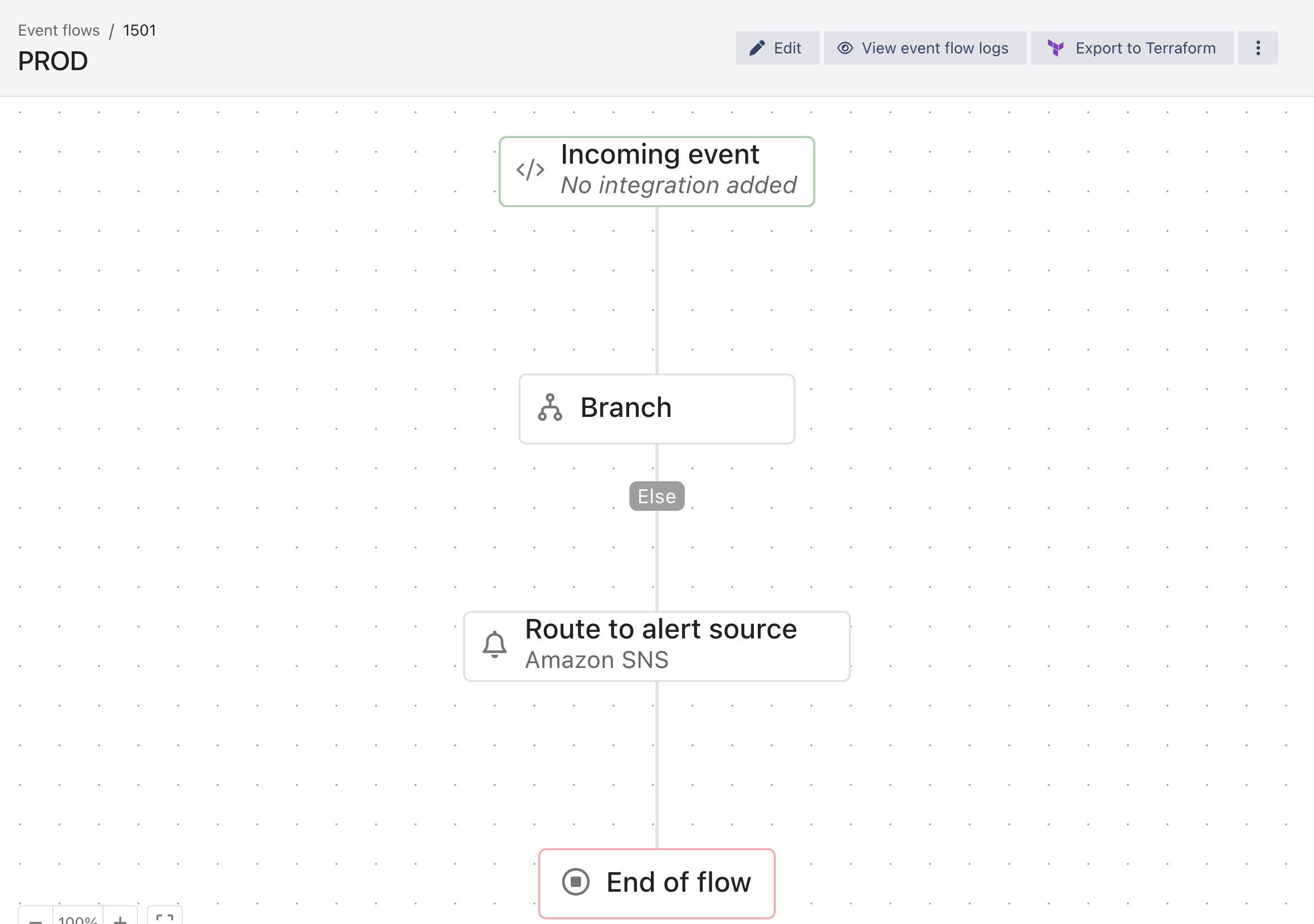
The Incoming event node always says what it is listening to — here, nothing yet. Grey chips are branch names, not nodes.
## The nodes
| Node | Does | Branches it adds |
| ------------------------- | -------------------------------------------------------------------------------------------------------- | ------------------------------------ |
| **Branch** | Evaluates conditions against the payload | one per condition group, plus `Else` |
| **Route to alert source** | Sends the event to an alert source, optionally overriding its escalation policy or notification priority | none |
| **Support hours** | Splits on your [support hours](/alerting/configure-alerting/support-hours.md) definition | `In hours`, `Out of hours` |
| **Wait** | Pauses the event before the next node runs | none |
| **Transform event** | Modifies event properties before they continue | none |
Every path ends at **End of flow**. An event that reaches it without passing a **Route to alert source** node creates no alert — which is a legitimate way to drop events, and also the most common reason a flow "does nothing". The run is still recorded, though: the event appears in the [event flow logs](#see-what-a-flow-actually-did), with the path it took ending in **Flow ended**.
### Branch
Conditions are built the same way as an [event filter](/alerting/configure-alerting/alert-sources.md#event-filter): filter groups combined with AND / OR, over ilert event properties (`context.event.summary`), custom payload fields (`context.event.customDetails.labels`), integration type and event timestamp.
Branches are evaluated **in order, first match wins** — so order matters, and a broad condition placed early will shadow the specific ones after it. Anything matching nothing takes the `Else` path.
{% embed url="" %}
Branch order: the first match wins, and Else takes the rest
{% endembed %}
### Wait
Two modes, and the second is the interesting one:
* **Duration** — hold for a number of seconds, minutes, hours or days.
* **Support hours** — **Wait until start of support hours** or **Wait until end of support hours**, measured against a support hour you pick. An event that is already past the boundary it would wait for continues immediately: the start option holds nothing that arrives in hours, and the end option holds nothing that arrives out of hours. A boundary that never comes is the same case: against support hours that cover 24/7 with no out-of-hours holiday exception ahead, **Wait until end of support hours** has no end to wait for, so the event continues immediately.
Waiting until business hours begin is how you stop a low-severity event from paging at 3am without dropping it: it simply arrives at 9.
### Transform event
Rewrites fields before the event continues — set a value, copy from another field, map values onto new ones, apply a template, merge properties, append to an array. This node is in **closed beta**; if it is disabled in your account, the tooltip explains how to ask for access.
## Working with large flows
Every node's three-dot menu offers **Copy node**, **Copy subtree**, **Cut subtree** and the matching paste actions. A subtree is a node plus everything below it, so a branch you have tuned can be duplicated in one action.
**Export to Terraform**, in the header of a saved flow, produces the flow as Terraform configuration — useful when a flow is something you would rather review in a pull request than rebuild by hand in another account.
## See what a flow actually did
**Alerting** → **Event flows** → **Event flow logs**, or **View event flow logs** on a single flow. Each entry shows the path an event took, which branch it matched, and — for flows containing a **Wait** node — whether it is currently paused, what it is waiting for, and why it resumed.
Start here when a flow did not do what you expected. It reports what happened, rather than what the canvas suggests should have.
## FAQ
### Can one integration feed several flows?
Not the same integration key. Create another integration key of the same type and attach that one to the second flow.
### What happens if no branch matches?
The event follows the `Else` path. If that path has no **Route to alert source** node, no alert is created.
### Do event flows replace alert sources?
No — they sit in front of them. A flow's job is to choose a destination; the alert source still owns filtering, grouping, templates, priority and escalation once the event lands.
### Can I test a flow before pointing production traffic at it?
Attach the flow's endpoint to a test integration and send events to it, then read the event flow logs. There is no dry-run mode.
### Where do I configure support hours?
**Alerting** → **Support hours**. See [Support hours](/alerting/configure-alerting/support-hours.md).
---
# Agent Instructions
This documentation is published with GitBook. GitBook is the documentation platform designed so that both humans and AI agents can read, navigate, and reason over technical content effectively. Learn more at gitbook.com.
## Querying This Documentation
If you need additional information that is not directly available in this page, you can query the documentation by asking a question.
Perform an HTTP GET request on the following URL with the `ask` and `goal` query parameters:
```
GET https://docs.ilert.com/alerting/configure-alerting/event-flows.md?ask=&goal=
```
`ask` is the immediate question: it should be specific, self-contained, and written in natural language.
`goal` is what the user is ultimately trying to achieve, the reason they need the answer. Sharing it helps GitBook give you a better, more relevant answer. A goal is most helpful when it describes the outcome the user wants rather than restating the question. For example, with `ask=how do I create an API token`, a goal like `automate deployments from our CI pipeline` lets GitBook tailor the answer to that use case.
The response will contain a direct answer to the question and relevant excerpts and sources from the documentation.
Use this mechanism when the answer is not explicitly present in the current page, you need clarification or additional context, or you want to retrieve related documentation sections.