> For the complete documentation index, see [llms.txt](https://docs.ilert.com/llms.txt). Markdown versions of documentation pages are available by appending `.md` to page URLs; this page is available as [Markdown](https://docs.ilert.com/alerting/configure-alerting/notification-settings/mute-notifications.md).
# Mute notifications
Silence every ilert notification channel for a set period — a night off, a flight, a holiday.
Muting stops ilert reaching you on any channel until a time you pick. It is the blunt instrument, deliberately: there is nothing to configure per-channel and nothing to undo afterwards, because it expires on its own.
## Turn it on
1. Click your avatar in the top right.
2. Toggle **Mute notifications**.
3. Under **Mute for**, pick a preset duration, or **Custom …** and set an end date and time. The **+1 hour**, **+3 hours** and **+1 day** shortcuts fill it in.
4. Click **Mute notifications**.
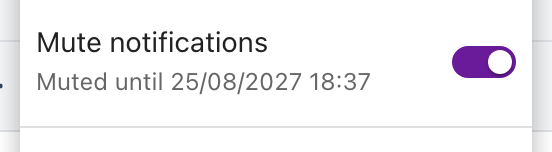
While muting is active the row shows when it expires. Toggle it off to end early.
The dialog states plainly what muting covers:
Read the third line before relying on this.
{% embed url="" %}
A two-minute walkthrough
{% endembed %}
## What muting does and does not do
| | |
| ---------------- | ------------------------------------------------------------------------------------------------------------------------------------------------ |
| **Silenced** | Alert notifications on every channel — push, SMS, phone call, email, WhatsApp, Telegram |
| **Silenced** | On-call reminder notifications for your upcoming shifts |
| **Not silenced** | Live calls to a [call routing](/call-routing/getting-started-with-call-routing.md) number. Someone calling your support line still rings through |
{% hint style="warning" %}
**Muting does not take you off call.**
Alerts are still assigned to you, and escalation still runs its clock against you — you simply are not told. If you are genuinely away, add a [schedule override](/on-call-management-and-escalations/on-call-schedules.md) so someone else is on call, and mute on top of that if you want the quiet as well.
{% endhint %}
## Your colleagues can see it
While you are muted, your avatar carries a small crossed-out bell everywhere it appears in ilert — responder lists, schedules, alert timelines. Hovering it shows **Muted until** and the time. Someone deciding whom to pull into an incident can see at a glance that you will not hear them.
## FAQ
### Can I end a mute early?
Yes. Open the user menu and toggle **Mute notifications** off.
### Can an admin mute someone else?
No. Muting is yours alone. An admin can change another user's notification rules, but not mute them.
### Does muting stop alerts from being created?
No. Alerts are created, assigned and escalated exactly as usual. Muting only suppresses the notifications that would have reached you. To stop alerts being created, use a [maintenance window](/alerting/configure-alerting/maintenance-windows.md).
### Which plans include this?
All of them, including Free.
---
# Agent Instructions
This documentation is published with GitBook. GitBook is the documentation platform designed so that both humans and AI agents can read, navigate, and reason over technical content effectively. Learn more at gitbook.com.
## Querying This Documentation
If you need additional information that is not directly available in this page, you can query the documentation dynamically by asking a question.
Perform an HTTP GET request on the current page URL with the `ask` query parameter, and the optional `goal` query parameter:
```
GET https://docs.ilert.com/alerting/configure-alerting/notification-settings/mute-notifications.md?ask=&goal=
```
`ask` is the immediate question: it should be specific, self-contained, and written in natural language.
`goal` is optional and describes the broader end goal you are ultimately trying to accomplish on behalf of the user. GitBook uses it to tailor the answer towards what is most useful for that goal.
The response will contain a direct answer to the question and relevant excerpts and sources from the documentation.
Use this mechanism when the answer is not explicitly present in the current page, you need clarification or additional context, or you want to retrieve related documentation sections.