> For the complete documentation index, see [llms.txt](https://docs.ilert.com/llms.txt). Markdown versions of documentation pages are available by appending `.md` to page URLs; this page is available as [Markdown](https://docs.ilert.com/call-routing/call-flows.md).

# Routing calls using call flows

Build a call flow on the visual canvas: add nodes, branch on what the caller does, and decide who gets reached.

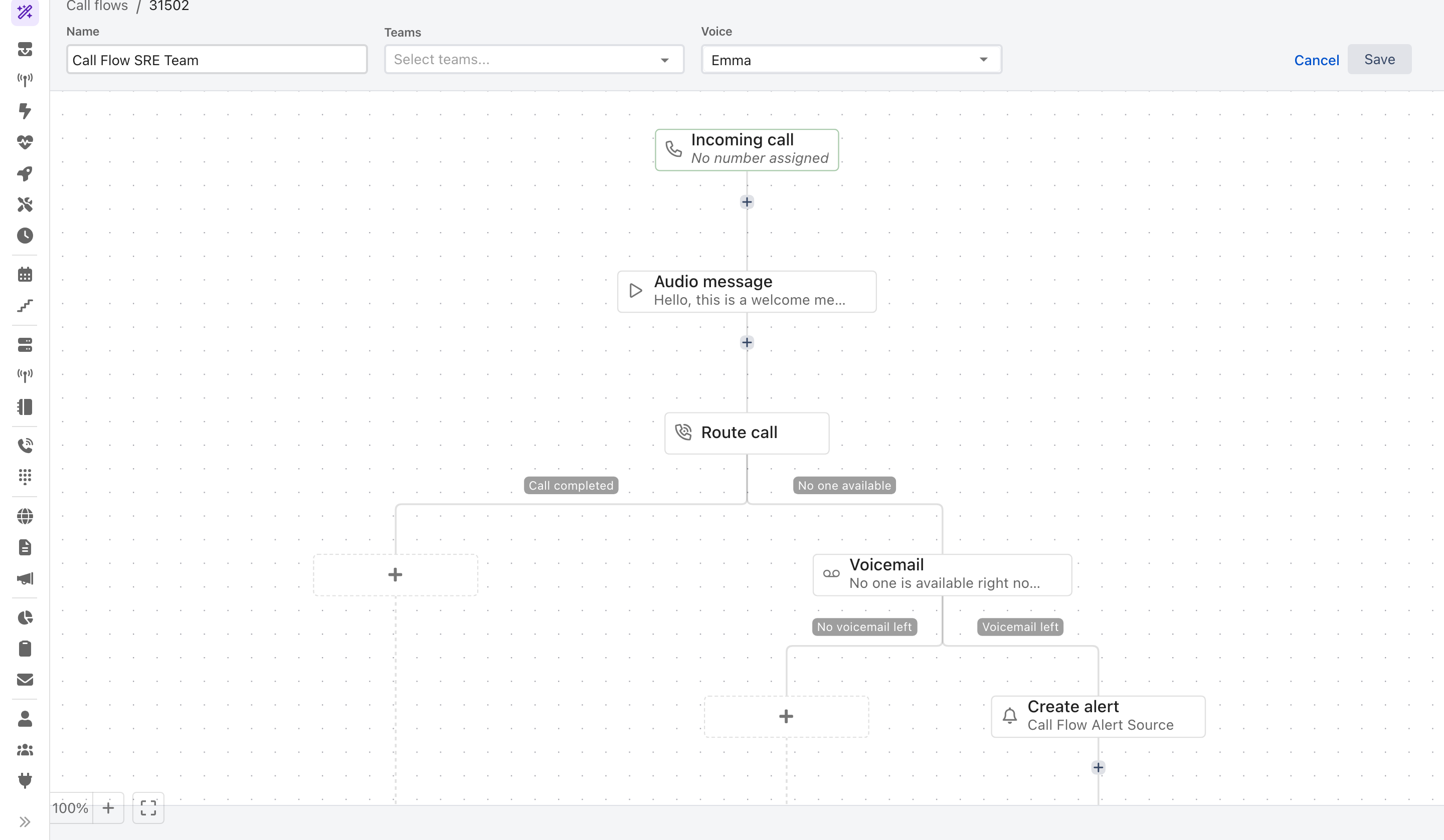
A call flow is a tree. The **Incoming call** node at the top is where every call starts, each node below it does one thing, and most nodes split the call into named branches — *did someone answer, or not?* — that you fill in independently. Every path eventually reaches **Call ends**.

<figure><img src="https://3394882078-files.gitbook.io/~/files/v0/b/gitbook-x-prod.appspot.com/o/spaces%2F-M76ygPnS4HUcFSX8ulm%2Fuploads%2Fgit-blob-88aad105eedf7c6c748083518b1a96ed48f7ff89%2Fcall-flow-editor.png?alt=media" alt="The ilert call flow builder: a header with Name, Teams and Voice fields and a Save button, above a canvas showing Incoming call, Audio message and Route call nodes, with grey branch chips reading Call completed, No one available, No voicemail left and Voicemail left leading to a Voicemail and a Create alert node."><figcaption><p>Each node adds its own branches. The grey chips are branch names, not nodes.</p></figcaption></figure>

## Three fields above the canvas

| Field     | What it does                                                                 |
| --------- | ---------------------------------------------------------------------------- |
| **Name**  | Identifies the flow in lists and logs                                        |
| **Teams** | The [teams](/users-and-access-management/teams.md) that may manage this flow |
| **Voice** | The text-to-speech voice used by **every** node in the flow that speaks      |

The voice is set once for the whole flow, not per node. Some entries are marked **Legacy** — those are the older, more synthetic voices, kept so existing flows do not change how they sound.

## Build your first flow

This builds the most common flow there is: callers reach whoever is on call, and anyone who cannot be reached leaves a voicemail that becomes an alert.

{% stepper %}
{% step %}

### Create the flow

In the sidebar, go to **Call routing** → **Call flows** and click **Create new call flow**. Give it a name and pick a voice.
{% endstep %}

{% step %}

### Greet the caller

Click the **+** below **Incoming call** and choose **Audio message**. Type what the caller should hear, and use **Preview** to listen to it before moving on.
{% endstep %}

{% step %}

### Route to the on-call responder

Click the **+** below the audio message and choose **Route call**. Add an on-call schedule as the target, so the flow follows your rotation instead of naming a person. See [Route call node](/call-routing/call-flows/route-call-node.md).
{% endstep %}

{% step %}

### Handle nobody answering

The Route call node adds two branches. Under **No one available**, add a **Voicemail** node, then a [**Create alert**](/call-routing/call-flows/create-alert-node.md) node beneath its **Voicemail left** branch. The recording is attached to the alert automatically.
{% endstep %}

{% step %}

### Save it

Click **Save**. Nothing is live yet — a flow with no phone number assigned answers no calls.
{% endstep %}
{% endstepper %}

## Assign a phone number

Click the **Incoming call** node and select one of your [provisioned numbers](/call-routing/getting-started-with-call-routing.md). The button in the top right then changes from **Save** to **Publish**, because saving a flow that answers a real number is a different act from saving a draft.

Two dialogs can interrupt that, and both are warning you about something real:

| Dialog                          | What it means                                                                                                 |
| ------------------------------- | ------------------------------------------------------------------------------------------------------------- |
| **Ongoing calls detected**      | Someone is on the line right now. Your changes take effect immediately and will affect that call in progress. |
| **Phone number already in use** | The number still answers through the old call routing, which will stop working the moment you publish.        |

## The nodes

Nine nodes are available from any **+** on the canvas. The ones that split the call list their branches here, because the branch names are what you will be looking for on the canvas.

| Node                                                                | Does                                                                                       | Branches it adds                      |
| ------------------------------------------------------------------- | ------------------------------------------------------------------------------------------ | ------------------------------------- |
| [**Support hours**](/call-routing/call-flows/support-hours-node.md) | Branches on your [support hours](/alerting/configure-alerting/support-hours.md) definition | `During`, `Outside`                   |
| [**IVR menu**](/call-routing/call-flows/ivr-menu-node.md)           | Offers a menu and branches on what the caller picks                                        | one per key, plus `No input`          |
| **Voicemail**                                                       | Lets the caller record a message                                                           | `Voicemail left`, `No voicemail left` |
| **Audio message**                                                   | Plays a message and continues                                                              | none                                  |
| **Ask for PIN code**                                                | Asks for a PIN and checks it against the codes you set                                     | `Code match`, `No code match`         |
| [**Route call**](/call-routing/call-flows/route-call-node.md)       | Rings users, schedules or teams                                                            | `Call completed`, `No one available`  |
| [**Create alert**](/call-routing/call-flows/create-alert-node.md)   | Raises an ilert alert in a call routing alert source                                       | none                                  |
| **Block numbers**                                                   | Rejects calls from numbers you list                                                        | none                                  |
| [**AI voice agent**](/call-routing/ai-voice-agent.md)               | Talks to the caller, works out why they called, and routes on that                         | one per intent, plus `Fallback`       |

Nothing creates an alert on its own. A call becomes an alert only where you place a **Create alert** node, which is why the voicemail branch above needs one.

### Ask for PIN code

Set one or more PIN codes, each with an optional label — useful when each customer gets their own code and you want to know which one called. **Max PIN entry attempts** controls how many tries a caller gets before the flow follows `No code match`.

### Voicemail and audio messages

Both nodes take either **Text to speech**, spoken in the flow's voice, or a **Sound file** you upload.

{% hint style="info" %}
**Uploaded audio will not sound like your source file.**

ilert converts uploads for telephone use, which is a narrow, lossy channel. Expect reduced clarity whatever you upload. MP3, WAV and OGG are accepted.
{% endhint %}

### Block numbers

List the numbers you want rejected. Calls from them are dropped before reaching the rest of the flow, which is the point of putting this node near the top.

## Working with large flows

Every node has a three-dot menu offering **Copy node**, **Copy subtree**, **Cut subtree**, **Paste node** and **Paste subtree**. A subtree is the node plus everything hanging below it, so a multi-level IVR branch can be duplicated in one action instead of rebuilt.

ilert refuses to paste a subtree into itself, which would otherwise build a loop the call could never leave.

## See what a call actually did

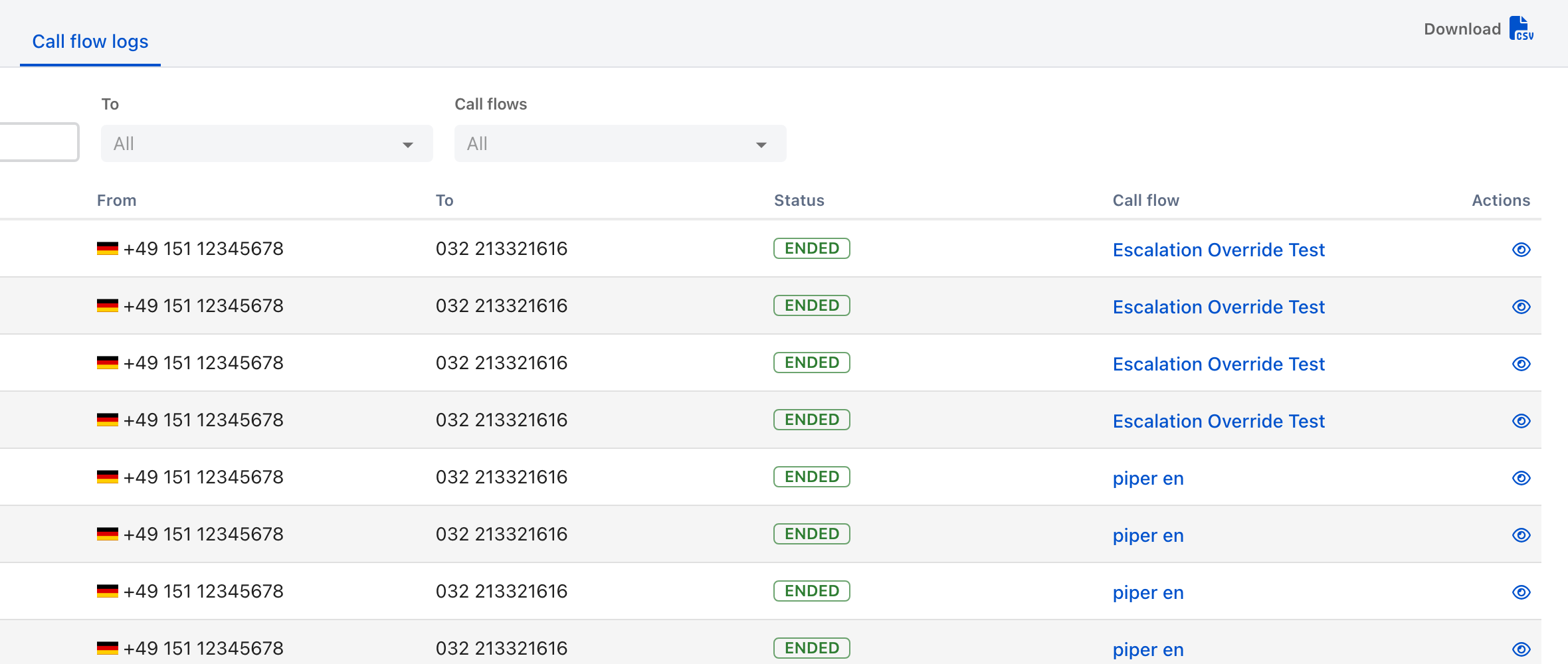
**Call routing** → **Call flow logs** lists every call: when it arrived, the caller's number, the number dialed, how it ended, and which flow handled it. Open one to see the path the call took through the flow, who took it, and — for calls handled by the [AI voice agent](/call-routing/ai-voice-agent.md) — the audio and text transcripts of the conversation.

<figure><img src="https://3394882078-files.gitbook.io/~/files/v0/b/gitbook-x-prod.appspot.com/o/spaces%2F-M76ygPnS4HUcFSX8ulm%2Fuploads%2Fgit-blob-6506c27164b2bdd64b4182f1bd6f8024f87e5f4f%2Fcall-flow-logs.png?alt=media" alt="The Call flow logs tab in ilert, with From and To date filters and a call flow filter above a table of calls showing date, masked caller number, destination number, an ENDED status chip, and the call flow that handled each call."><figcaption><p>Start here when a flow did not do what you expected. Caller numbers are masked in this screenshot, not in the product.</p></figcaption></figure>

This is the first place to look when a flow misbehaves, and it is more reliable than reasoning about the canvas: it shows what happened rather than what should have.

## FAQ

### Does a call create an alert automatically?

No. Only a **Create alert** node creates an alert, wherever you place it. This is deliberate — most flows should raise an alert on some branches and not others.

### Can one flow answer several numbers?

No. A flow answers one number, and a number is answered by one flow. To share logic between numbers, copy the flow and change what differs.

### Can I test a flow before it goes live?

Assign a number and call it. There is no simulator — but a flow with no number assigned cannot be reached, so an unassigned draft is safe to build up over time.

### I changed a flow while a call was in progress. What happened?

The change took effect immediately, including for that call. ilert warns you with the **Ongoing calls detected** dialog before saving when it can see a live call.

### What happened to the old call routing?

Call routing was rebuilt around this visual builder, and the earlier linear configuration — greeting, then menu, then voicemail — was retired. Accounts still on it were migrated. If a phone number of yours still answers through the old system, publishing a call flow onto that number moves it across, and ilert warns you before it does.


---

# Agent Instructions
This documentation is published with GitBook. GitBook is the documentation platform designed so that both humans and AI agents can read, navigate, and reason over technical content effectively. Learn more at gitbook.com.

## Querying This Documentation
If you need additional information that is not directly available in this page, you can query the documentation dynamically by asking a question.

Perform an HTTP GET request on the current page URL with the `ask` query parameter, and the optional `goal` query parameter:

```
GET https://docs.ilert.com/call-routing/call-flows.md?ask=<question>&goal=<endgoal>
```

`ask` is the immediate question: it should be specific, self-contained, and written in natural language.
`goal` is optional and describes the broader end goal you are ultimately trying to accomplish on behalf of the user. GitBook uses it to tailor the answer towards what is most useful for that goal.

The response will contain a direct answer to the question and relevant excerpts and sources from the documentation.

Use this mechanism when the answer is not explicitly present in the current page, you need clarification or additional context, or you want to retrieve related documentation sections.