> For the complete documentation index, see [llms.txt](https://docs.ilert.com/llms.txt). Markdown versions of documentation pages are available by appending `.md` to page URLs; this page is available as [Markdown](https://docs.ilert.com/chatops/google-chat/create-alerts-in-google-chat.md).

# Create alerts in Google Chat

Let people raise an ilert alert from a Google Chat space with the /il-alert slash command — with or without an ilert account.

{% hint style="info" %}
**Install and connect the ilert app first**

An **Admin** or **Account owner** connects the app once, as described in the [Google Chat app guide](/chatops/google-chat/google-chat-app.md).
{% endhint %}

`/il-alert` raises an ilert alert from the space it is typed in. There are two ways to set it up:

|                | Who can raise an alert                           | What you configure                                                                             |
| -------------- | ------------------------------------------------ | ---------------------------------------------------------------------------------------------- |
| **Restricted** | Google Chat users who also have an ilert account | Nothing beyond connecting the app                                                              |
| **Open**       | Anyone in the Workspace                          | A Google Chat alert source, which fixes the spaces and the escalation policies they can choose |

Both can be in use at once: in a space covered by a Google Chat alert source, people with an ilert account still reach their own alert sources through **Advanced settings**.

The command works in any named space the ilert app has been added to.

## Option 1: Restrict to Google Chat users with an ilert account

Once the app is connected, anyone whose ilert username or email address matches their Google address can type `/il-alert` in a space.

Text after the command becomes the summary, so `/il-alert API not responding` opens the dialog with the summary already filled in.

<figure><img src="https://3394882078-files.gitbook.io/~/files/v0/b/gitbook-x-prod.appspot.com/o/spaces%2F-M76ygPnS4HUcFSX8ulm%2Fuploads%2Fgit-blob-6d89e704ada6030e301b83e946d0129ea1707b8d%2Fgoogle-chat-il-alert-command.png?alt=media" alt="A Google Chat message box containing the slash command il-alert followed by the words API not responding." width="375"><figcaption><p>Whatever follows the command becomes the alert summary.</p></figcaption></figure>

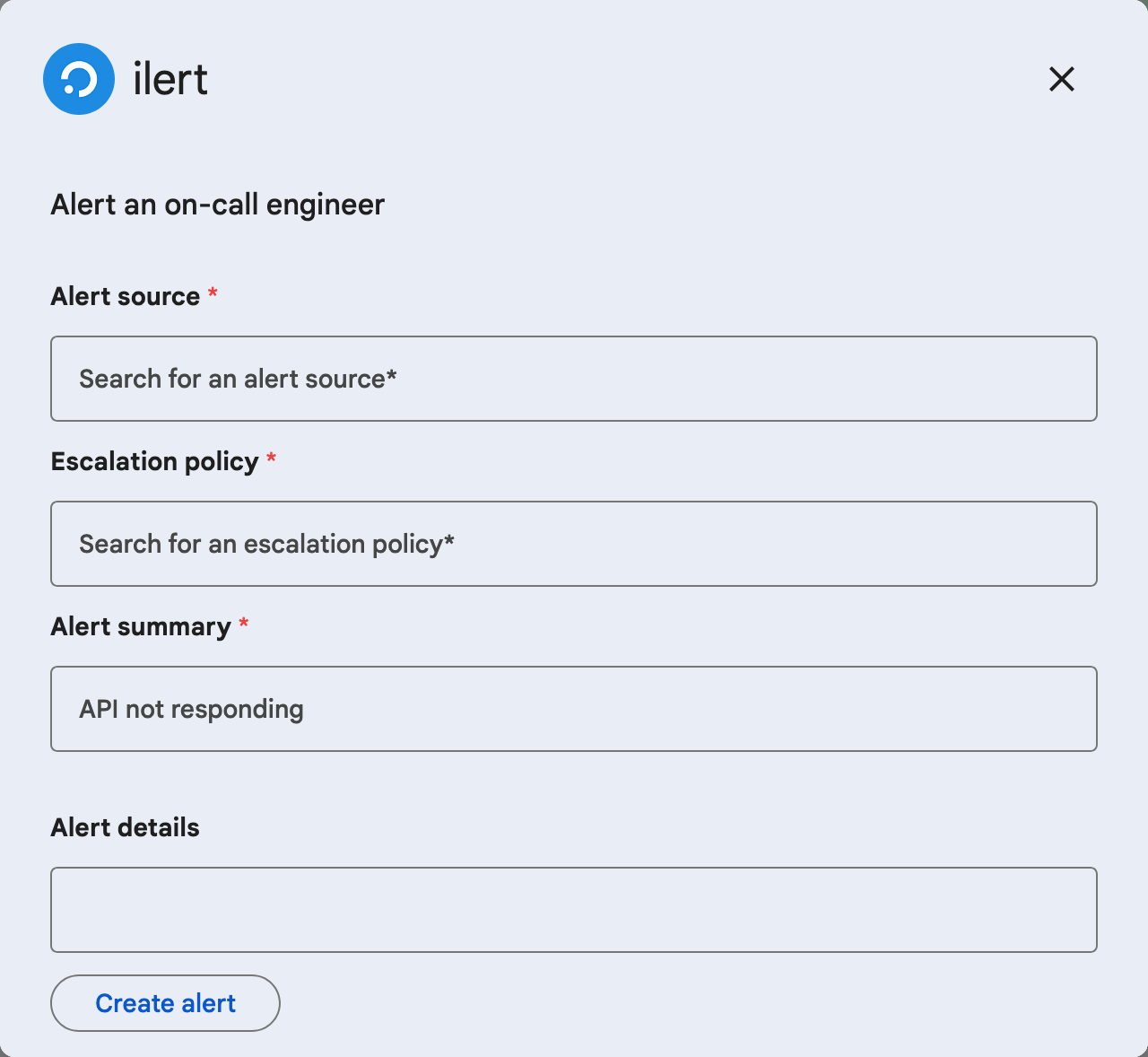
The dialog, **Alert an on-call engineer**, asks for:

| Field                 |                                                                                                                   |
| --------------------- | ----------------------------------------------------------------------------------------------------------------- |
| **Alert source**      | Required. Searches the alert sources this user may read, and shows the first 50 matches — there is no second page |
| **Escalation policy** | Required. Searches the escalation policies this user may read                                                     |
| **Alert summary**     | Required                                                                                                          |
| **Alert details**     | Optional                                                                                                          |

<figure><img src="https://3394882078-files.gitbook.io/~/files/v0/b/gitbook-x-prod.appspot.com/o/spaces%2F-M76ygPnS4HUcFSX8ulm%2Fuploads%2Fgit-blob-3cbec738756eef7e640c8ad66c3b023fe72d054a%2Fgoogle-chat-create-alert.png?alt=media" alt="The ilert dialog in Google Chat with the fields Alert source, Escalation policy, Alert summary, and Alert details, and a Create alert button." width="375"><figcaption><p>What someone with an ilert account sees: their own alert sources and escalation policies.</p></figcaption></figure>

**Create alert** raises the alert, and the app confirms in the space with a card that links to it.

Because the search covers only what the person may read in ilert, their permissions carry over from ilert into Google Chat.

Finding an alert source is not the same as being allowed to raise an alert on it. ilert also checks that the person may create, assign, escalate and add responders to alerts. A **Viewer** can read every alert source, so the search offers them, and the submission is then refused. A **Responder**, **User**, **Admin** or **Account owner** passes.

Nobody without an ilert account is permission-checked at all. Open the command up with [Option 2](#option-2-let-anyone-in-the-workspace-raise-an-alert) and a colleague with no ilert account can raise alerts that a **Viewer** with an account cannot.

## Option 2: Let anyone in the Workspace raise an alert

Colleagues without an ilert account can raise alerts too, from spaces you nominate. This needs a dedicated **Google Chat alert source**: it decides which spaces the command works in, which escalation policies people can pick, and which priority and alert actions the resulting alerts get.

{% stepper %}
{% step %}

## Create a Google Chat alert source

In the sidebar, go to **Alerting** → **Alert sources** and click **Create new alert source**. Pick the **Google Chat** tile and click **Next**.
{% endstep %}

{% step %}

## Name it and choose who is notified

Give it a name such as *Google Chat alerts from Support*, assign teams if you use them, and choose the escalation policy that handles alerts from this source. Click **Continue setup**. Leave grouping alone: it has no effect on alerts raised from chat.

ilert saves the alert source and opens its **Google Chat settings** directly — there is no **Create** button in this wizard.
{% endstep %}

{% step %}

## Choose the spaces and the escalation policies

On **Google Chat settings**, fill in:

| Field                                            |                                                                                                                                                                                             |
| ------------------------------------------------ | ------------------------------------------------------------------------------------------------------------------------------------------------------------------------------------------- |
| **Google Chat spaces**                           | The spaces where `/il-alert` works for people without an ilert account. A space can belong to only one Google Chat alert source; picking one that is taken shows an error and blocks saving |
| **Escalation policies**                          | What people can choose in the dialog. Leave it empty and the source's own escalation policy is used. Keep it to 10: ilert asks for at most 10 but does not stop you                         |
| **Custom label for escalation policy selection** | The question above the choices. The default is "Please select the team you'd like to alert"                                                                                                 |
| *Display names*                                  | Optional, once policies are chosen: a shorter name per policy to show in Google Chat, at most 24 characters                                                                                 |

**Dialog preview** shows what the dialog will look like while you edit.
{% endstep %}

{% step %}

## Finish the setup

Click **Continue setup**, then **Finish setup** on the general settings page.

For an existing alert source, the same fields live under the **Google Chat settings** tab of its edit page.
{% endstep %}
{% endstepper %}

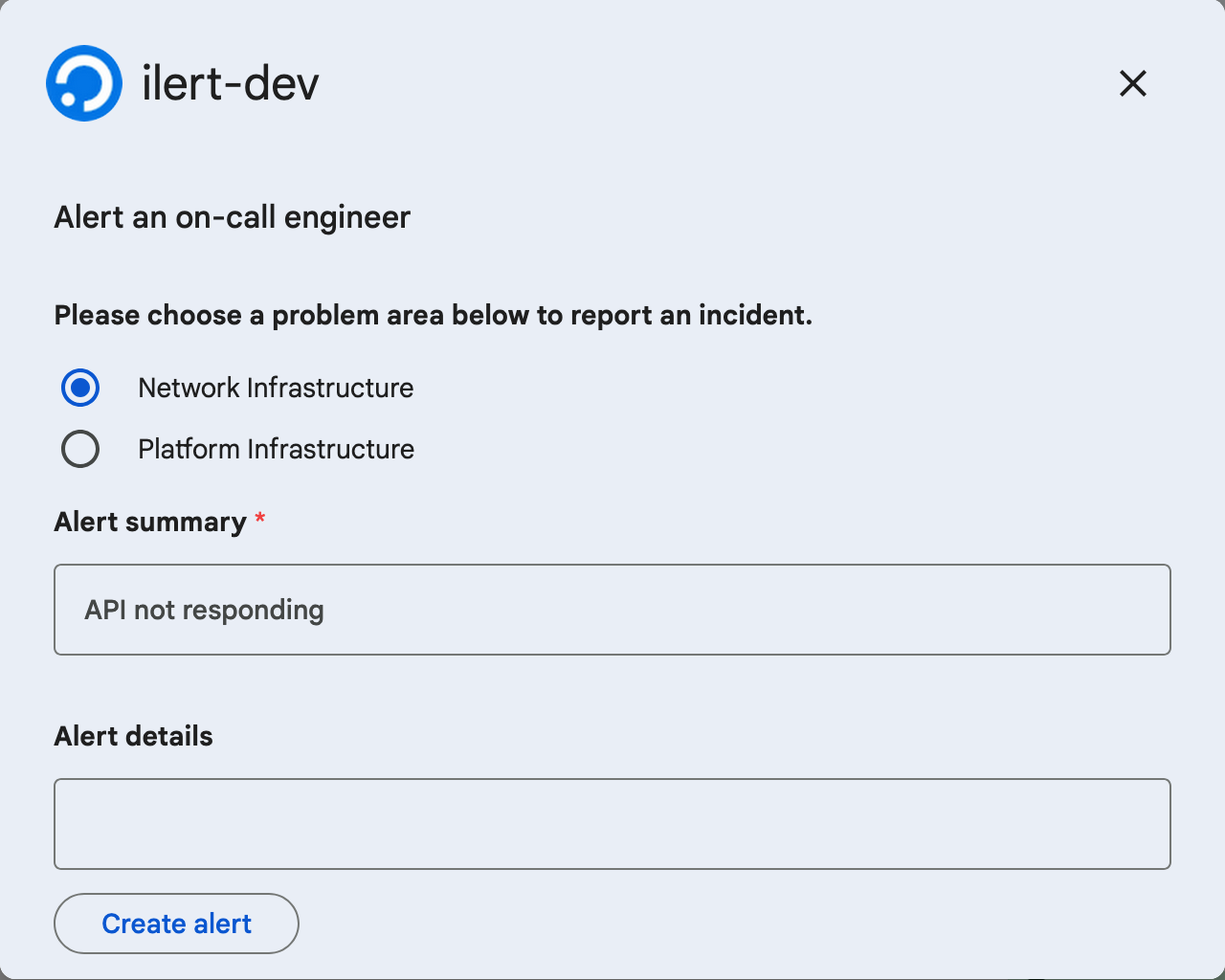
Anyone in those spaces can now type `/il-alert`. They see your question, the escalation policies you chose as radio buttons, and the summary and details fields.

<figure><img src="https://3394882078-files.gitbook.io/~/files/v0/b/gitbook-x-prod.appspot.com/o/spaces%2F-M76ygPnS4HUcFSX8ulm%2Fuploads%2Fgit-blob-daa1ae8b229d686c7ea2ad6bcde46383d71553f6%2Fgoogle-chat-create-alert-from-space.png?alt=media" alt="The ilert dialog in Google Chat showing a question with two escalation policies as radio buttons, an Alert summary field, an Alert details field, and a Create alert button." width="375"><figcaption><p>What people see in a space that belongs to a Google Chat alert source.</p></figcaption></figure>

## What happens when someone submits

* The alert belongs to the alert source that was chosen, or to the Google Chat alert source of the space. It takes that source's **priority** and its alert actions — nobody picks a priority in Google Chat. Grouping does not apply, so every submission creates a new alert.
* The app confirms in the space, visible to everyone: "✅ An alert has been created successfully by *name*", with a card linking to the alert.
* An alert raised by someone with an ilert account is created as that user. An alert raised by anyone else has no creator in ilert; the confirmation in Google Chat names them.

## FAQ

### "There is no Google Chat alert source configured for this space in ilert…"

The full message reads: "There is no Google Chat alert source configured for this space in ilert, which is required to enable alert creation for Google Chat users without an ilert account."

The space is not listed in any Google Chat alert source, and the person typing has no ilert account that matches their Google address. Either add the space to a Google Chat alert source ([Option 2](#option-2-let-anyone-in-the-workspace-raise-an-alert)), or check that their Google address matches their ilert username or email address.

### "Failed to fetch data for your ilert account…"

ilert could not load the alert sources for this space. Check that the Google Workspace is still connected — run `/il-connect` in the space — and that the space belongs to the connected Workspace.

### Which escalation policies can people choose?

Someone with an ilert account can search every escalation policy they may read. Everyone else is limited to the policies listed in the space's Google Chat alert source — or, if none are listed there, to that source's own escalation policy.

### Can people pick the priority?

No. The alert source decides, exactly as it does for alerts from a monitoring tool. To have different priorities, create more than one Google Chat alert source and give each its own spaces.


---

# Agent Instructions
This documentation is published with GitBook. GitBook is the documentation platform designed so that both humans and AI agents can read, navigate, and reason over technical content effectively. Learn more at gitbook.com.

## Querying This Documentation
If you need additional information that is not directly available in this page, you can query the documentation dynamically by asking a question.

Perform an HTTP GET request on the current page URL with the `ask` query parameter, and the optional `goal` query parameter:

```
GET https://docs.ilert.com/chatops/google-chat/create-alerts-in-google-chat.md?ask=<question>&goal=<endgoal>
```

`ask` is the immediate question: it should be specific, self-contained, and written in natural language.
`goal` is optional and describes the broader end goal you are ultimately trying to accomplish on behalf of the user. GitBook uses it to tailor the answer towards what is most useful for that goal.

The response will contain a direct answer to the question and relevant excerpts and sources from the documentation.

Use this mechanism when the answer is not explicitly present in the current page, you need clarification or additional context, or you want to retrieve related documentation sections.