> For the complete documentation index, see [llms.txt](https://docs.ilert.com/llms.txt). Markdown versions of documentation pages are available by appending `.md` to page URLs; this page is available as [Markdown](https://docs.ilert.com/getting-started/quick-start-guide/troubleshooting.md).
# Troubleshooting
Diagnose events that never become alerts, alerts that never resolve, and notifications that never arrive.
Most setup problems come down to one of three questions: did the event arrive, did it become an alert, and did the alert reach a person. Work through them in that order — each section below tells you where to look for the answer rather than what to guess.
## Start with the alert source logs
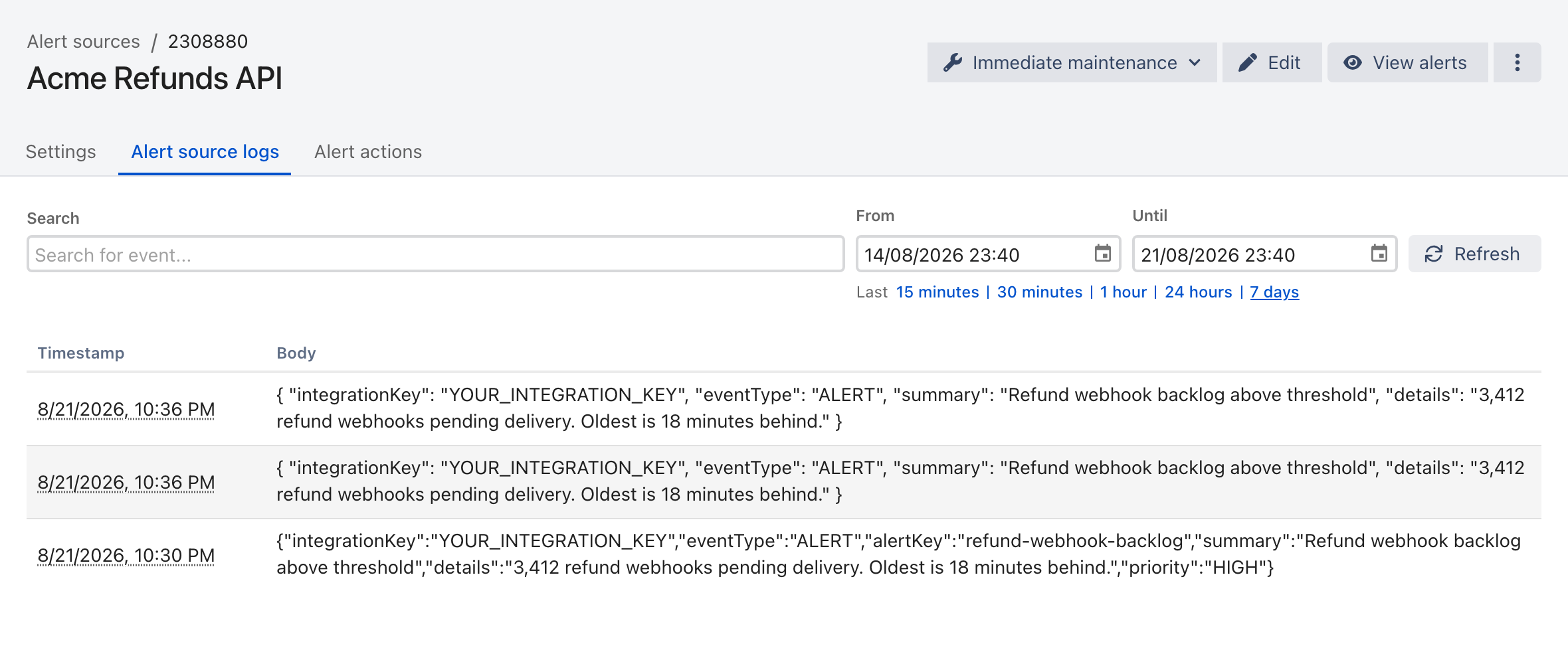
The **Alert source logs** tab on an alert source is the record of what ilert actually received and what it did with it. Check it before changing any settings.
Each row is one received event, with the raw payload ilert parsed. Use the time range links to widen the window.
{% hint style="warning" %}
**`202 Accepted` does not mean an alert was created.**
The Events API queues your event and answers `202` with an empty body. An event that is later filtered, deduplicated into an existing alert, or rejected returns exactly the same `202`. The response never tells you the outcome — the alert source log does.
{% endhint %}
Events appear in the log with a short delay, so widen the range with **Last 1 hour** rather than concluding an event was lost.
## Events are not creating alerts
### Events appear in the log, but no alert exists
The alert source received the event and deliberately did not open a new alert. In order of likelihood:
* **The event was grouped into an existing alert.** If the event's `alertKey` matches an alert that is still open, ilert appends to that alert instead of creating another one — regardless of the grouping mode you selected. Alert keys are trimmed and compared **case-insensitively**, so `SRV-1` and `srv-1` are the same alert. Check **Grouped events** on the open alert.
* **A grouping window swallowed it.** With time-based or smart grouping, events arriving inside the window join the current alert.
* **An event filter rejected it.** Check the alert source's event filter conditions against the payload shown in the log.
### No events appear in the log at all
Nothing reached the alert source. The event never left your tool, or it went somewhere else:
* **Wrong integration key.** Each alert source has its own key. Copy it again from the source's **Settings** tab — a truncated or stale key silently routes nowhere.
* **Malformed JSON.** Confirm the payload parses. A missing comma is the most common cause, and it fails before ilert ever sees a valid event.
* **Missing required fields.** `integrationKey`, `eventType`, and `summary` are all required.
* **Network path.** Verify the sender can reach the API at all:
```bash
curl -I https://api.ilert.com/api
```
If that fails, check egress firewall rules, proxy configuration, and DNS from the host that sends the events.
### Alerts do not resolve automatically
* Confirm your tool actually sends resolve events. In Prometheus Alertmanager, for example, that means `send_resolved: true` on the receiver.
* The resolve event must carry the **same `alertKey`** as the alert it should close. Matching is case-insensitive, but a different key resolves nothing.
* Confirm the resolve event has `"eventType": "RESOLVE"`.
If you would rather close stale alerts on a timer, enable **Auto-resolution** on the alert source instead.
## Notifications are not arriving
Open the alert and read its **Timeline** first. It records every notification ilert sent, on which channel, and when. That single check splits the problem in two.
### The timeline shows notifications, but you received nothing
The alert reached the notification stage, so the problem is the channel or the contact:
* Confirm the phone number or email is **verified** in **Notification settings**.
* Check that you have not muted notifications — the user menu has a **Mute notifications** toggle.
* For push, use **Send test notification** next to the registered device. If the test fails, reinstall and re-register the device.
* On iOS, high-priority alerts need [critical alerts](/mobile-app/mobile-app-notification-settings/critical-push-notifications-and-dnd-overrides/ios-critical-alerts-configuration.md) enabled to break through Do Not Disturb. On Android, see [DND configuration](/mobile-app/mobile-app-notification-settings/critical-push-notifications-and-dnd-overrides/android-push-notification-dnd-configuration.md).
### The timeline shows no notifications at all
Nobody was selected to notify, or escalation stopped before reaching you:
* **The alert was accepted.** Accepting halts escalation by design — ilert treats the alert as owned and stops paging. This is the single most common cause of "escalation stopped working". If you want a safety net for alerts that are accepted but never resolved, use an alert action on the `v-alert-not-resolved` trigger rather than another escalation level.
* **Nobody is on call.** An escalation rule that targets a schedule with no active shift **falls through immediately**, without waiting for its escalation timeout. If no rule in the policy has a live target, nobody is notified at all. Check the schedule for the current time.
* **The alert is low priority.** A `LOW` alert only ever uses the **first** escalation rule and never advances past it.
* **Support hours downgraded it.** Support hours do not suppress alerts — they create `LOW` alerts outside the configured window, which then behave as above. If you expected a page at 2am and got none, this is usually why. Enable **Auto-raise alerts** to re-raise still-pending alerts when support hours begin.
* **Your notification rules have no matching rule.** Rules are per-priority; a profile with rules only for high-priority alerts stays silent on low-priority ones.
## API errors
| Status | Meaning | What to do |
| ------ | ------------------------------------------------------------------------------------- | ---------------------------------------------------------------------------------------------------------------- |
| `400` | Invalid request | With `max-results`, the page cap is per endpoint and overshooting is a hard error, not a clamp. Lower the value. |
| `401` | No `Authorization` header | Add the header. Note the Events API does not use one — it authenticates with the integration key in the body. |
| `403` | Unknown, revoked, or malformed API key (`code: KEY_ERROR`), or a missing OAuth2 scope | Reissue the key. Retry logic keyed on `401` never fires here, so handle `403` explicitly. |
| `429` | Rate limited | Back off and retry. There are two independent buckets — REST calls per token, and events per integration key. |
{% hint style="info" %}
`429` responses carry no `Retry-After` header and no rate-limit headers. Derive your pacing from the `429`s you actually receive rather than from a fixed number, since limits vary per account and integration.
{% endhint %}
A `404` means the entity is not there **for you**. That covers both "it does not exist" and "your key cannot see it" — the API does not distinguish the two on purpose. Widen the key's permissions or team context and try again rather than reading it as proof of deletion.
## Contacting support
Include these so support can trace the exact request:
* The **`correlation-id`** response header from the failing API call. This is the fastest way to find your event in the logs.
* The **alert source ID** and a timestamp with time zone.
* The raw payload you sent, with the integration key removed.
* What you expected to happen, and what happened instead.
Reach support at or through the in-app chat.
---
# Agent Instructions
This documentation is published with GitBook. GitBook is the documentation platform designed so that both humans and AI agents can read, navigate, and reason over technical content effectively. Learn more at gitbook.com.
## Querying This Documentation
If you need additional information that is not directly available in this page, you can query the documentation by asking a question.
Perform an HTTP GET request on the following URL with the `ask` and `goal` query parameters:
```
GET https://docs.ilert.com/getting-started/quick-start-guide/troubleshooting.md?ask=&goal=
```
`ask` is the immediate question: it should be specific, self-contained, and written in natural language.
`goal` is what the user is ultimately trying to achieve, the reason they need the answer. Sharing it helps GitBook give you a better, more relevant answer. A goal is most helpful when it describes the outcome the user wants rather than restating the question. For example, with `ask=how do I create an API token`, a goal like `automate deployments from our CI pipeline` lets GitBook tailor the answer to that use case.
The response will contain a direct answer to the question and relevant excerpts and sources from the documentation.
Use this mechanism when the answer is not explicitly present in the current page, you need clarification or additional context, or you want to retrieve related documentation sections.