# Incidents

## What is an incident?

An incident is the coordination record for a significant, business-impacting event. It is the place where your team comes together to respond: you link the alerts that contributed to it, page the people you need, track a timeline of everything that happened, and—when it is time—communicate with your customers.

Where an [alert](/alerting/working-with-alerts.md) is a machine-generated signal designed to page on-call responders, an incident is a deliberate, human-declared record designed for coordination. Declaring an incident does not depend on an alert firing—you can declare one whenever you need to mobilize a response.

{% hint style="info" %}
**Availability**

Incidents are available for ilert accounts created after May 18, 2026. We are rolling the feature out to existing accounts over the coming weeks and months. To opt in sooner, contact <support@ilert.com>.
{% endhint %}

## Alerts, incidents, and status updates

ilert separates the technical signal, the internal coordination, and the public communication into three distinct entities. Understanding how they relate is key to using incidents effectively.

| Entity            | Created by                         | Audience                          | Purpose                                              |
| ----------------- | ---------------------------------- | --------------------------------- | ---------------------------------------------------- |
| **Alert**         | Monitoring tools (automatically)   | On-call responders                | A technical signal that pages the right people.      |
| **Incident**      | Declared manually or from an alert | Your response team (internal)     | The coordination record that organizes the response. |
| **Status update** | Posted from an incident            | Customers & stakeholders (public) | The public message shown on your status pages.       |

An incident is **internal**. Nothing about an incident is visible to your customers until you deliberately [post a status update](/incidents-and-status-pages/status-updates.md). This lets you investigate and coordinate before deciding what—if anything—to communicate publicly.

{% hint style="info" %}
What ilert previously called an "incident" is now a [**status update**](/incidents-and-status-pages/status-updates.md). The name **Incident** now refers to the coordination record described on this page.
{% endhint %}

## The incident lifecycle

A typical incident follows this path:

{% stepper %}
{% step %}

#### An alert pages the on-call responder

A monitoring tool fires an alert, and ilert pages whoever is on call. The responder begins investigating.
{% endstep %}

{% step %}

#### You declare an incident

When the issue needs coordinated response, you [declare an incident](/incidents-and-status-pages/incidents/declare-an-incident.md)—from the alert, or from scratch. The triggering alert is linked, and its responders join the incident.
{% endstep %}

{% step %}

#### You coordinate the response

You [page additional responders](/incidents-and-status-pages/incidents/responders-and-paging.md), open an [incident channel](/incidents-and-status-pages/incidents/incident-channels.md) for real-time discussion, and keep a [timeline](/incidents-and-status-pages/incidents/incident-timeline-and-comments.md) of decisions and findings.
{% endstep %}

{% step %}

#### You communicate publicly

If the incident affects customers, you [post status updates](/incidents-and-status-pages/status-updates.md) to your status pages, keeping severity and internal detail private.
{% endstep %}

{% step %}

#### You resolve the incident

Once the impact has ended, you set the incident to **Resolved**. Linked alerts resolve with it.
{% endstep %}
{% endstepper %}

## Severity

Every incident has a severity that communicates its business impact. ilert uses five fixed levels:

| Severity | Meaning                                               |
| -------- | ----------------------------------------------------- |
| **SEV1** | Critical — major service disruption, highest priority |
| **SEV2** | High — significant impact, urgent response            |
| **SEV3** | Medium — limited impact, partial degradation          |
| **SEV4** | Low — minor degradation, no service impact            |
| **SEV5** | Informational                                         |

New incidents default to **SEV3**. You can change the severity at any time from the incident view.

## Status

The status reflects where an incident is in its lifecycle. It is internal to ilert and separate from the public status shown on a [status update](/incidents-and-status-pages/status-updates.md).

| Status            | Meaning                                                    |
| ----------------- | ---------------------------------------------------------- |
| **Declared**      | The incident has just been created.                        |
| **Investigating** | The team is actively investigating the root cause.         |
| **Identified**    | The root cause has been found and a fix is underway.       |
| **Monitoring**    | A fix is in place and the team is watching for recurrence. |
| **Resolved**      | The impact has ended and the incident is closed.           |

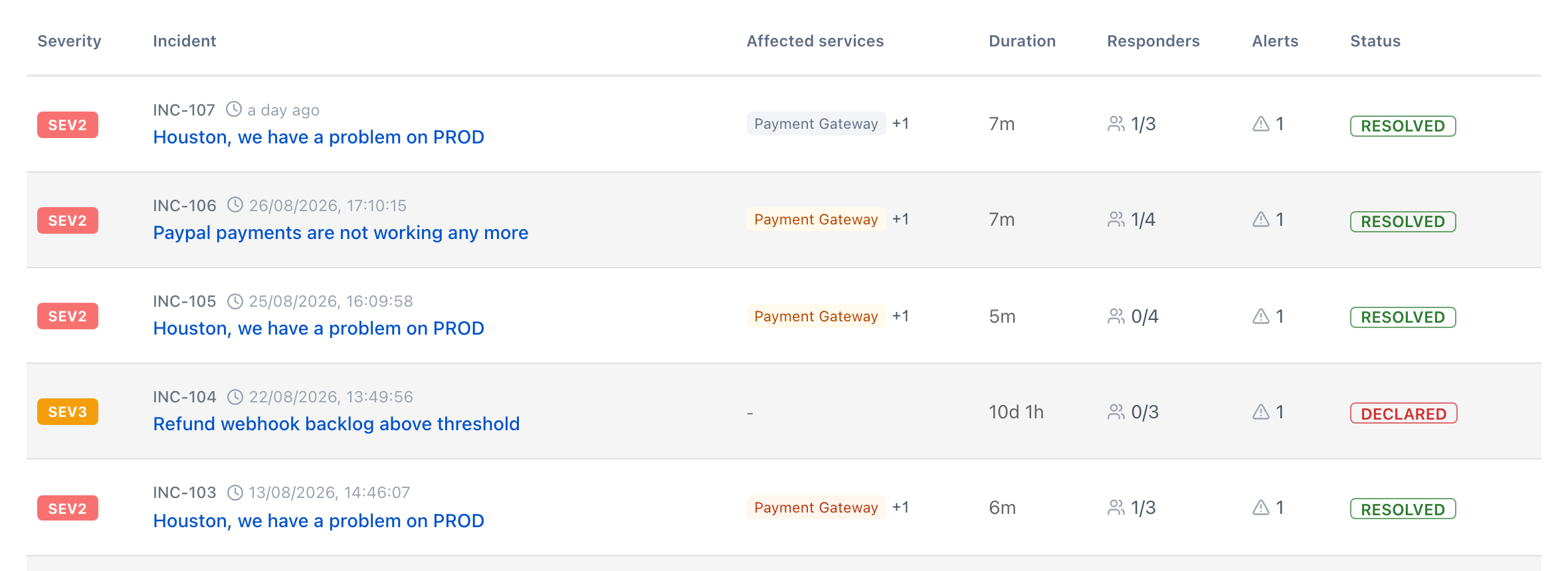
## The incidents list

Open **Incidents** in the main navigation to see every incident your teams own. Each row shows the severity, affected services, duration, how many responders have joined, the number of linked alerts, and the current status.

<figure><img src="/files/iOuzhwCCOZXcnZUR6am7" alt="The incidents list"><figcaption><p>The incidents list</p></figcaption></figure>

## The incident view

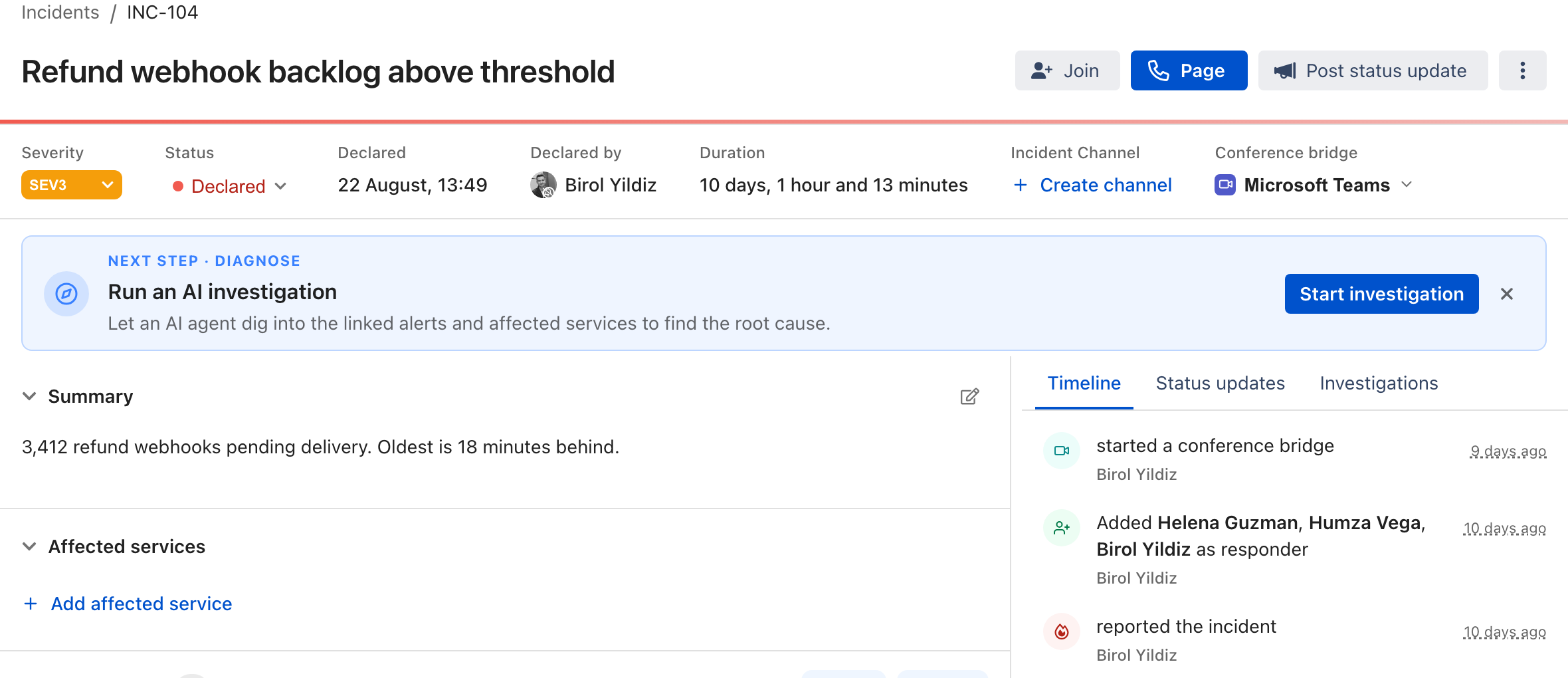
Opening an incident brings everything about the response onto one screen:

<figure><img src="/files/qrnZTzrskg9ZyMTRioA5" alt="The incident view"><figcaption><p>The incident view</p></figcaption></figure>

* **Header** — the incident title, its `INC-` number, severity, and status. Severity and status are editable here.
* **Summary** — an internal description of what is known so far.
* **Affected services** — the [services](/incidents-and-status-pages/services.md) impacted by the incident, each with an impact level.
* **Responders and subscribers** — the people [working the incident and watching it](/incidents-and-status-pages/incidents/responders-and-paging.md).
* **Linked alerts** — the [alerts](/incidents-and-status-pages/incidents/declare-an-incident.md#linking-alerts-to-an-incident) that contributed to the incident.
* **Incident channel** — the [chat channel](/incidents-and-status-pages/incidents/incident-channels.md) connected to the incident, if one exists.
* **Timeline** — an [append-only log](/incidents-and-status-pages/incidents/incident-timeline-and-comments.md) of everything that happened, plus comments and status updates.

## Next steps

<table data-view="cards"><thead><tr><th></th><th></th><th data-hidden data-card-target data-type="content-ref"></th></tr></thead><tbody><tr><td><strong>Declare an incident</strong></td><td>Open an incident from scratch or from an alert, and link related alerts.</td><td><a href="/pages/XhUSzkvSC7dQPZEBLarH">/pages/XhUSzkvSC7dQPZEBLarH</a></td></tr><tr><td><strong>Responders and paging</strong></td><td>Page the people you need and manage who is working the incident.</td><td><a href="/pages/OqxM3NXluMXdYqzK9Oq0">/pages/OqxM3NXluMXdYqzK9Oq0</a></td></tr><tr><td><strong>Incident timeline and comments</strong></td><td>Track what happened and keep your team aligned.</td><td><a href="/pages/CcG6CafZlaIBvffHuh8I">/pages/CcG6CafZlaIBvffHuh8I</a></td></tr><tr><td><strong>Incident channels</strong></td><td>Connect a Slack, Microsoft Teams, or Google Chat channel for real-time coordination.</td><td><a href="/pages/u76kAyw2clWxVrXwDIMl">/pages/u76kAyw2clWxVrXwDIMl</a></td></tr></tbody></table>


---

# Agent Instructions: Querying This Documentation

If you need additional information that is not directly available in this page, you can query the documentation dynamically by asking a question.

Perform an HTTP GET request on the current page URL with the `ask` query parameter:

```
GET https://docs.ilert.com/incidents-and-status-pages/incidents.md?ask=<question>
```

The question should be specific, self-contained, and written in natural language.
The response will contain a direct answer to the question and relevant excerpts and sources from the documentation.

Use this mechanism when the answer is not explicitly present in the current page, you need clarification or additional context, or you want to retrieve related documentation sections.