> For the complete documentation index, see [llms.txt](https://docs.ilert.com/llms.txt). Markdown versions of documentation pages are available by appending `.md` to page URLs; this page is available as [Markdown](https://docs.ilert.com/incidents-and-status-pages/incidents/declare-an-incident.md).
# Declare an incident
Declare an incident from scratch or from an alert, and link the alerts that led to it.
An [incident](/incidents-and-status-pages/incidents.md) starts one of two ways: from scratch, or from an alert that has revealed something bigger. Either way it opens in the **Declared** status, ready to coordinate.
## Declare from scratch
Use this when nothing fired — a customer report, a third-party outage, a security event, or an exercise.
{% stepper %}
{% step %}
### Open the dialog
Go to **Incidents** and click **Declare incident**.
{% endstep %}
{% step %}
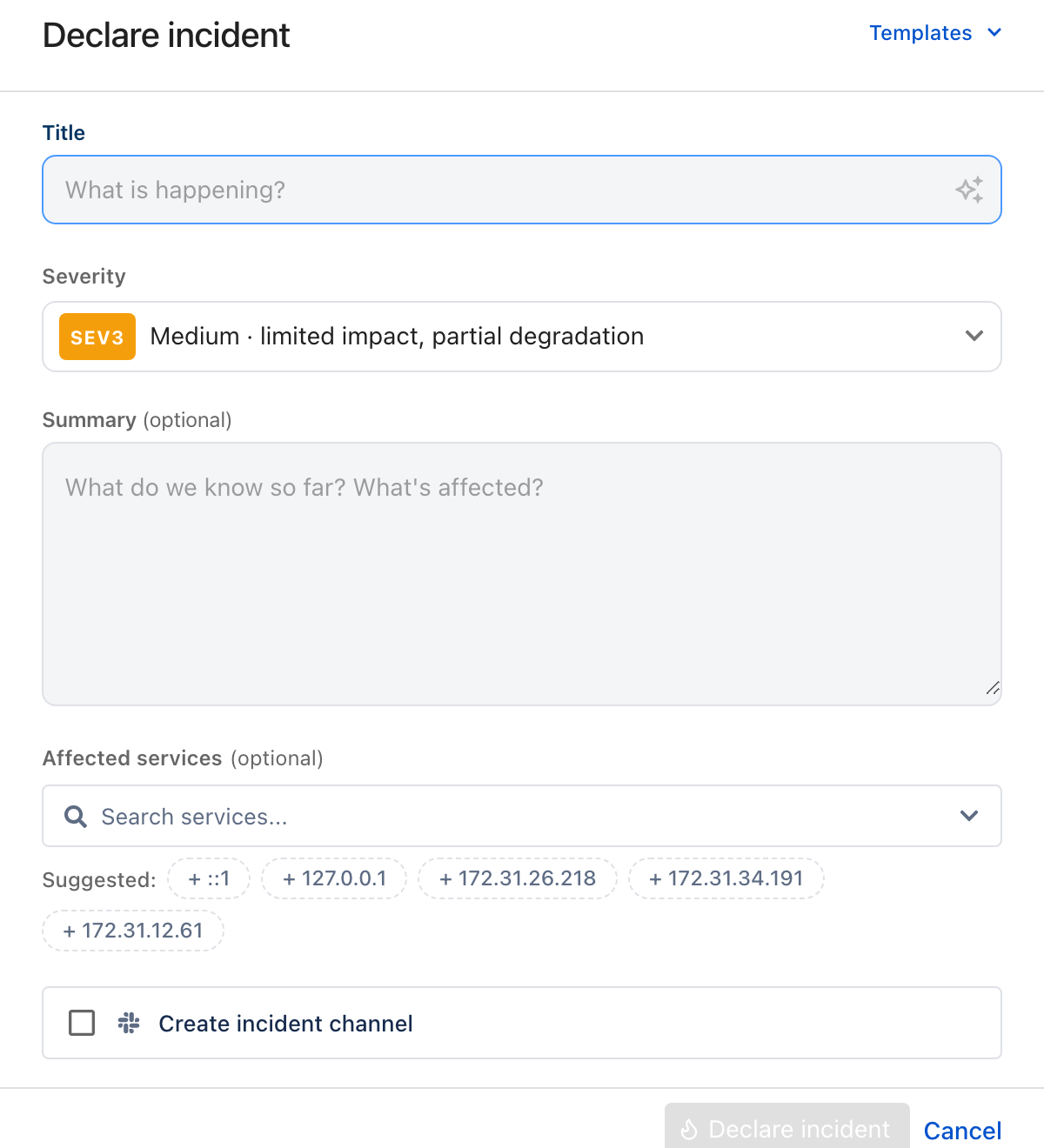
### Describe what is happening
Only Title and Severity are required, and severity is already filled in.
| Field | Required | What it does |
| --------------------------- | -------- | --------------------------------------------------------------------------------------------------------------------------------- |
| **Templates** | No | Fills **Title**, **Summary**, and **Severity** from a saved incident template. It never ticks **Create incident channel** for you |
| **Title** | Yes | A short internal description. Never shown publicly |
| **Severity** | Yes | The [business impact](/incidents-and-status-pages/incidents.md#severity). Defaults to **SEV3** |
| **Summary** | No | What is known so far. ilert AI can draft it from the title |
| **Affected services** | No | The [services](/incidents-and-status-pages/services.md) being impacted, each with an impact level. ilert suggests candidates |
| **Create incident channel** | No | Opens a [chat channel](/incidents-and-status-pages/incidents/incident-channels.md) with the incident |
{% hint style="info" %}
**Choosing SEV1 or SEV2 ticks Create incident channel for you.** It is a default, not a rule — untick it and it stays unticked, and applying a template never changes it either way.
{% endhint %}
{% endstep %}
{% step %}
### Declare it
Click **Declare incident**. It opens in the [incident view](/incidents-and-status-pages/incidents.md#the-incident-view), where you can page responders and start the timeline.
{% endstep %}
{% endstepper %}
## Declare from an alert
When an alert turns out to be the tip of something, open it and click **Declare incident**. The dialog arrives pre-filled:
* the **title** comes from the alert title;
* the **summary** is drafted from the alert details;
* **affected services** are pre-selected from the alert's related services, and you set each impact level;
* the alert is **linked**, and its responders become responders on the incident.
An escalation still running on that alert is **continued on the incident** rather than dropped, so nobody who was already being paged is lost. The dialog says so — *Current escalation will be continued* — and you can turn it off before declaring.
{% hint style="warning" %}
This is the one path that carries an escalation across. [Linking an alert](#linking-alerts-to-an-incident) to an incident that already exists does not: linking accepts the alert, and accepting stops escalation.
{% endhint %}
## Linking alerts to an incident
Linking records which alerts belong to this incident, so the incident becomes the one place to work and the alerts stop demanding attention of their own.
The alert you declare from is linked for you. To add more, open the incident and click **Link alert** in the **Linked alerts** section.
Linking an alert:
* **accepts it**, if it was still pending — which is what stops its escalation, because an accepted alert has an owner;
* adds its responders to the incident;
* sets its status to **Linked**, in the alerts list and on the alert itself.
{% hint style="info" %}
**Linked** replaces the status you would otherwise see, rather than sitting beside it. Underneath, the alert is **Accepted** — which is why escalation stops the moment you link — and the incident's own **Linked alerts** section shows that underlying status next to the time it was linked.
{% endhint %}
An alert belongs to at most one incident. Linking one that is already linked fails with an error rather than moving it.
### Unlinking
Click **Unlink** next to the alert. It goes back to showing **Accepted** — the status it has had all along, behind the **Linked** label — and nothing else changes. In particular its escalation does not restart, because accepting it was what stopped that. If it still needs someone, re-trigger escalation on the alert itself.
## What resolving does, and does not do
Resolving an incident does not resolve its alerts behind your back. It opens the [**Before you resolve**](/incidents-and-status-pages/incidents.md#resolving-an-incident) checklist, where closing each linked alert is offered and ticked by default. Untick one and it stays open, still accepted, still yours to deal with.
## Affected services and impact levels
Affected services record which business capabilities are being hit, each at an [impact level](/incidents-and-status-pages/services.md) such as *Degraded* or *Major outage*.
Setting them changes ilert **internally** — the incident, the lists, the internal dashboards. It changes nothing your customers see.
{% hint style="info" %}
A service's public status moves only when you [post a status update](/incidents-and-status-pages/status-updates.md). That gap is deliberate: it is what lets you mark something degraded internally at 03:00 and decide what to tell customers at 03:20.
{% endhint %}
---
# Agent Instructions
This documentation is published with GitBook. GitBook is the documentation platform designed so that both humans and AI agents can read, navigate, and reason over technical content effectively. Learn more at gitbook.com.
## Querying This Documentation
If you need additional information that is not directly available in this page, you can query the documentation by asking a question.
Perform an HTTP GET request on the following URL with the `ask` and `goal` query parameters:
```
GET https://docs.ilert.com/incidents-and-status-pages/incidents/declare-an-incident.md?ask=&goal=
```
`ask` is the immediate question: it should be specific, self-contained, and written in natural language.
`goal` is what the user is ultimately trying to achieve, the reason they need the answer. Sharing it helps GitBook give you a better, more relevant answer. A goal is most helpful when it describes the outcome the user wants rather than restating the question. For example, with `ask=how do I create an API token`, a goal like `automate deployments from our CI pipeline` lets GitBook tailor the answer to that use case.
The response will contain a direct answer to the question and relevant excerpts and sources from the documentation.
Use this mechanism when the answer is not explicitly present in the current page, you need clarification or additional context, or you want to retrieve related documentation sections.