> For the complete documentation index, see [llms.txt](https://docs.ilert.com/llms.txt). Markdown versions of documentation pages are available by appending `.md` to page URLs; this page is available as [Markdown](https://docs.ilert.com/incidents-and-status-pages/incidents/postmortems.md).

# Postmortems

A postmortem is a document ilert drafts from the incident and you finish, keeps beside it, and can publish to your status pages.

When the impact has ended, the question changes from *what is broken* to *why did this happen and what stops it happening again*. Answering it normally means someone spending an afternoon reconstructing a timeline out of chat scrollback, alert emails, and memory.

A postmortem in ilert starts from what the incident already knows. ilert AI reads the [timeline](/incidents-and-status-pages/incidents/incident-timeline-and-comments.md), the [linked alerts](/incidents-and-status-pages/incidents/declare-an-incident.md#linking-alerts-to-an-incident), the correlated [deployment events](/alerting/deployment-events.md), and — if you let it — the [incident channel](/incidents-and-status-pages/incidents/incident-channels.md), and drafts a document with five sections:

1. Key information
2. Timeline
3. Impact
4. Root cause analysis
5. Action items

The draft is a starting point, not an answer. What follows is yours to edit.

{% hint style="info" %}
**Beta.** The generation dialog is marked **BETA**, and its behaviour may still change.
{% endhint %}

## Generate one

The offer appears in two places, and they produce the same thing:

* on the [**Before you resolve**](/incidents-and-status-pages/incidents.md#resolving-an-incident) checklist, as **Generate a postmortem with AI now**;
* on a resolved incident that has no postmortem yet, as a **Next step · Wrap up** banner offering **Generate with AI**.

<figure><img src="https://3394882078-files.gitbook.io/~/files/v0/b/gitbook-x-prod.appspot.com/o/spaces%2F-M76ygPnS4HUcFSX8ulm%2Fuploads%2F1qlTVKht6w9ofLURXRn6%2Fimage.png?alt=media&amp;token=6689f8dd-41e8-4214-98ae-ac8359f76266" alt="A resolved ilert incident with a Next step, Wrap up banner reading Generate the postmortem — ilert AI drafts it from the timeline, linked alerts and correlated deploys — beside a Generate with AI button."><figcaption><p>The prompt arrives when the incident is over, which is when anyone has the attention for it.</p></figcaption></figure>

The banner knows when not to ask: it stays away from a **SEV4** or **SEV5** incident that lasted **30 minutes or less**. You can still generate one — nobody is stopped, they are just not nagged about a short, minor incident.

Either opens a dialog that asks what to read.

<figure><img src="https://3394882078-files.gitbook.io/~/files/v0/b/gitbook-x-prod.appspot.com/o/spaces%2F-M76ygPnS4HUcFSX8ulm%2Fuploads%2F3SL7i2pSsiUUkM8Fja1P%2Fimage.png?alt=media&amp;token=95f4611b-f6b5-43f6-9e11-d0899fd59eb7" alt="The Generate postmortem using ilert AI dialog: the five sections it will produce, a checklist of alerts to take into account, a collapsed option to paste a chat transcript, and optional Impact, Root cause and Action items fields."><figcaption><p>Sections that have nothing to offer are hidden: no linked channel, no channel question.</p></figcaption></figure>

| Choice                                | Why it matters                                                                                                                                                                                                                                |
| ------------------------------------- | --------------------------------------------------------------------------------------------------------------------------------------------------------------------------------------------------------------------------------------------- |
| **Which alerts to take into account** | Only alerts linked to the incident are offered. Including them is what produces technically specific action items rather than generic ones                                                                                                    |
| **Which chat channels to analyze**    | The ilert bot reads the [incident channel](/incidents-and-status-pages/incidents/incident-channels.md) and pulls out what mattered. You can also paste a transcript from anywhere else — timestamps and usernames in any raw shape are parsed |
| **Deployments**                       | The [deployments correlated with the incident](/alerting/deployment-events.md), so "we shipped the auth change 20 minutes before" ends up in the timeline                                                                                     |
| **Impact, root cause, action items**  | Three optional free-text fields. What you write here is weighted more heavily than what the AI infers, so use them for what you already know                                                                                                  |

Generation is queued rather than instant — the sources have to be fetched, paginated, and read — so the document appears a moment later.

## Edit it

When the document is ready, a card appears on the incident with its number, status and owner, and **Open postmortem** takes you into it.

<figure><img src="https://3394882078-files.gitbook.io/~/files/v0/b/gitbook-x-prod.appspot.com/o/spaces%2F-M76ygPnS4HUcFSX8ulm%2Fuploads%2Fgit-blob-40ca93ce0a591b0f03df6dc96758eadc27a9d007%2Fincident-postmortem-card.png?alt=media" alt="A postmortem card on an ilert incident, showing the word Postmortem with a DRAFT lozenge, the postmortem number and its owner, and an Open postmortem button at the right."><figcaption><p>The card stays on the incident, so the write-up is always one click from the record it describes.</p></figcaption></figure>

A postmortem is an ordinary document with a title and sections, edited in ilert. Markdown works, there is a formatting toolbar, and changes save themselves as you type: the header shows **Saving…** and then **Saved**.

**Add section** puts a new one at the end. Sections can be renamed and deleted; deleting one is confirmed first, because it is not undoable.

Above the body sits a key-information block ilert fills in from the incident and keeps in step: **Incident**, **Severity**, **Duration**, **Occurred**, **Responders**, **Affected services**.

A **Preview** panel runs down the right-hand side showing the rendered document as you edit it, with a download button in its corner for taking a copy elsewhere.

## Statuses

| Status        | Means                         |
| ------------- | ----------------------------- |
| **AI draft**  | Generated and untouched       |
| **Draft**     | Somebody has worked on it     |
| **In review** | Waiting on someone to read it |
| **Published** | Final                         |

{% hint style="info" %}
**The Status control reads&#x20;*****Draft*****&#x20;while the document is still an AI draft.** What tells them apart is the purple **AI draft** badge beside the title, which disappears once somebody moves the document along.
{% endhint %}

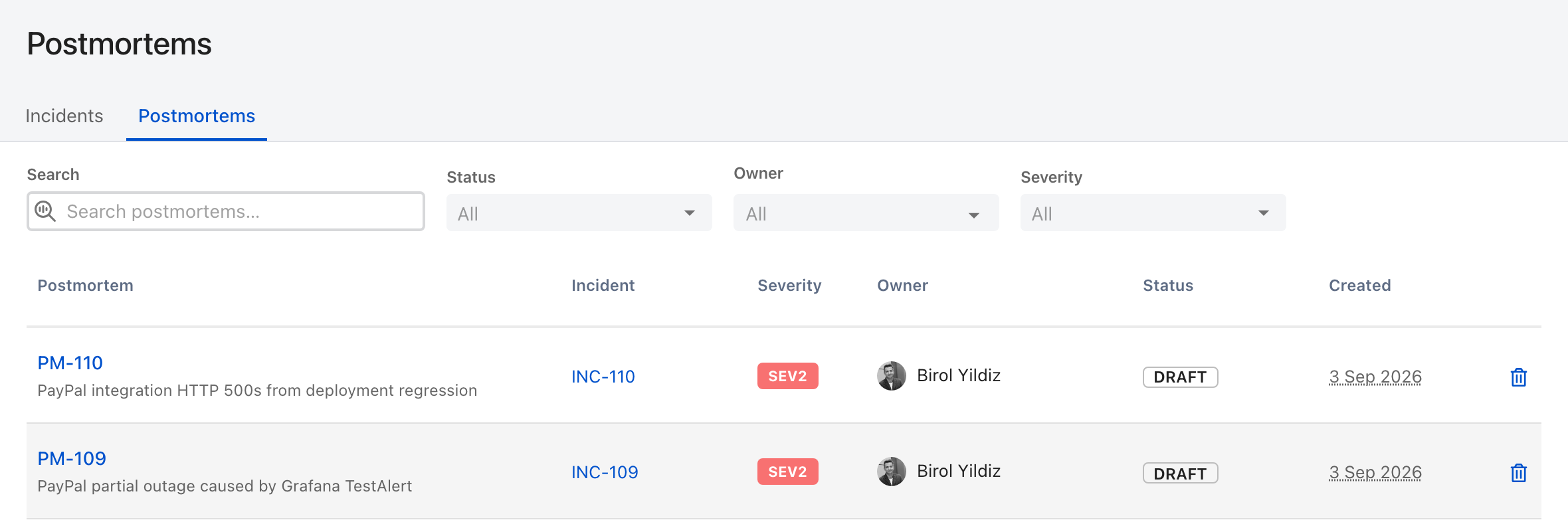
Every postmortem in the account is listed under **Postmortems** — in the sidebar under **Catalog**, and as a tab beside **Incidents**. Each row carries its linked incident, severity, owner, status and creation date, and the list filters by status, owner and severity. It is the view to open when you want to know what has actually been written up, rather than what people meant to write up.

<figure><img src="https://3394882078-files.gitbook.io/~/files/v0/b/gitbook-x-prod.appspot.com/o/spaces%2F-M76ygPnS4HUcFSX8ulm%2Fuploads%2Fgit-blob-b4a5b6c4faa2c1cb53e4dac71718033bf1625a59%2Fpostmortems-list.png?alt=media" alt="The ilert Postmortems list, a tab beside Incidents, with Search, Status, Owner and Severity filters above rows showing the postmortem number and title, its incident, severity, owner, status and creation date."><figcaption><p>One row per postmortem, each pointing back at the incident it came from.</p></figcaption></figure>

## Publish it

Publishing is a separate decision from finishing the document, and it has two settings.

| Setting                  | Effect                                                                                          |
| ------------------------ | ----------------------------------------------------------------------------------------------- |
| **Internal only**        | The default. Visible to your organization in the **Postmortems** list, and nowhere else         |
| **Also on status pages** | Surfaces the postmortem as a post-incident report on the status pages this incident appeared on |

<figure><img src="https://3394882078-files.gitbook.io/~/files/v0/b/gitbook-x-prod.appspot.com/o/spaces%2F-M76ygPnS4HUcFSX8ulm%2Fuploads%2FtRrcnUIhIIBpTc5aOown%2Fimage.png?alt=media&amp;token=59125a52-6e0a-4f5e-bb28-7fca44b803c1" alt="The Publishing section of an ilert postmortem: a note that it is available once the postmortem is Published, with Internal only selected and Also on status pages as the alternative."><figcaption><p><strong>Internal only</strong> is the default, and the section says up front that neither setting does anything yet.</p></figcaption></figure>

Choosing status pages then asks for a **Status page visibility** scope: **public and private** pages, or **private pages only** — which is how you give a post-incident report to named customers without putting it on the open internet.

{% hint style="info" %}
Neither option is available until the postmortem's status is **Published**. Up to that point it is internal whatever the publishing settings say.
{% endhint %}


---

# Agent Instructions
This documentation is published with GitBook. GitBook is the documentation platform designed so that both humans and AI agents can read, navigate, and reason over technical content effectively. Learn more at gitbook.com.

## Querying This Documentation
If you need additional information that is not directly available in this page, you can query the documentation dynamically by asking a question.

Perform an HTTP GET request on the current page URL with the `ask` query parameter, and the optional `goal` query parameter:

```
GET https://docs.ilert.com/incidents-and-status-pages/incidents/postmortems.md?ask=<question>&goal=<endgoal>
```

`ask` is the immediate question: it should be specific, self-contained, and written in natural language.
`goal` is optional and describes the broader end goal you are ultimately trying to accomplish on behalf of the user. GitBook uses it to tailor the answer towards what is most useful for that goal.

The response will contain a direct answer to the question and relevant excerpts and sources from the documentation.

Use this mechanism when the answer is not explicitly present in the current page, you need clarification or additional context, or you want to retrieve related documentation sections.