> For the complete documentation index, see [llms.txt](https://docs.ilert.com/llms.txt). Markdown versions of documentation pages are available by appending `.md` to page URLs; this page is available as [Markdown](https://docs.ilert.com/incidents-and-status-pages/status-pages.md).

# Status pages

Create a status page, put it on your own domain, and let it update itself from the services behind it.

A status page is where your users go when something looks wrong, so that they do not have to ask. It shows the current state of the [services](/incidents-and-status-pages/services.md) you put on it, the [status updates](/incidents-and-status-pages/status-updates.md) you post, and — if you want — [metrics](/incidents-and-status-pages/metrics.md) and scheduled maintenance.

{% hint style="info" %}
**Which kind of page?** [Public vs private](/incidents-and-status-pages/status-pages/public-vs-private-status-pages.md) covers the first decision. If you need different customers to see different services on the same page, read [audience-specific status pages](/incidents-and-status-pages/status-pages/audience-specific-status-page.md).
{% endhint %}

{% hint style="warning" %}
The Free plan includes a limited public status page. A public page for a wide audience, or any private or audience-specific page, is a paid add-on — see [pricing](https://www.ilert.com/pricing).
{% endhint %}

## Create a page

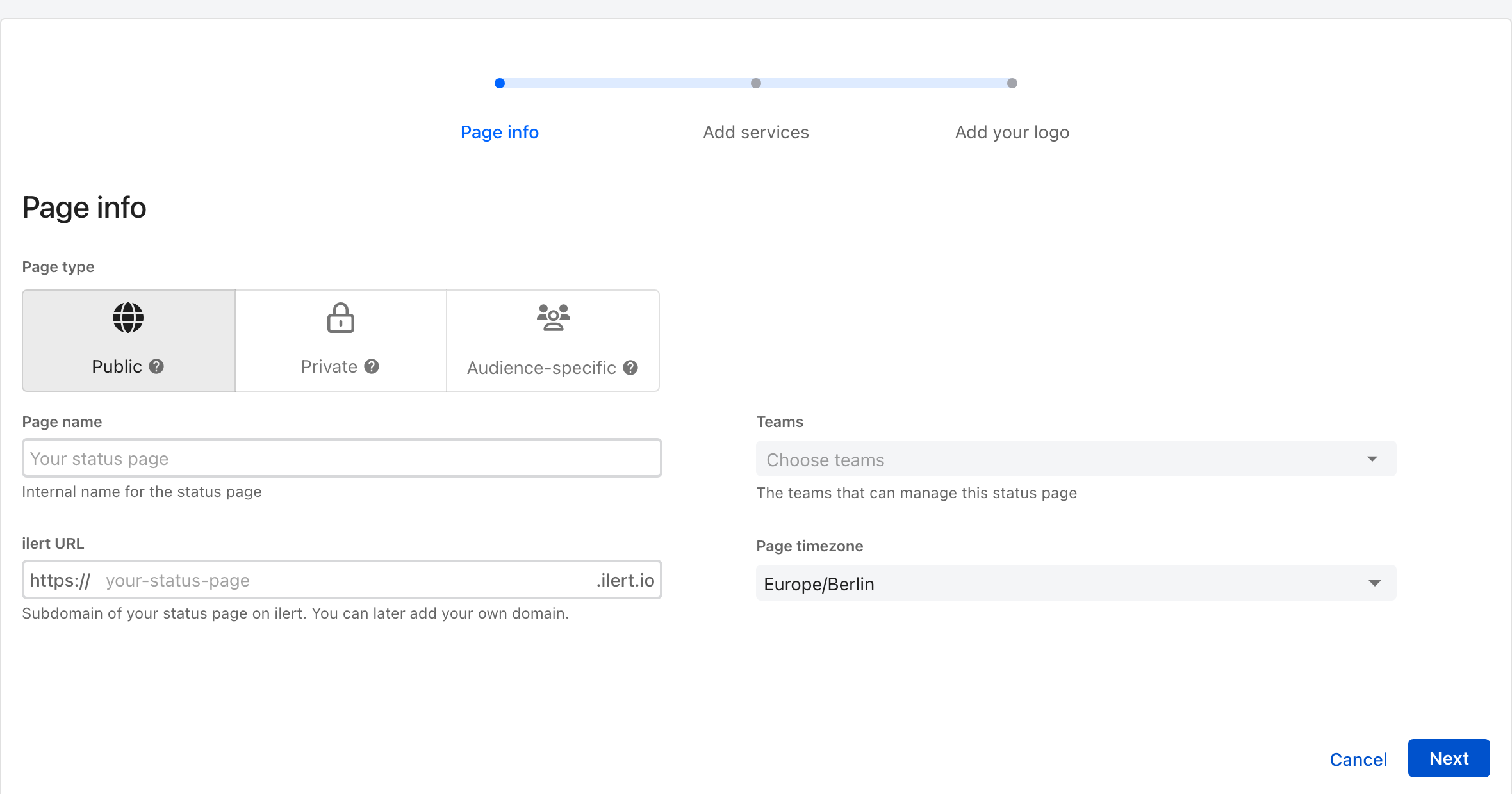
Go to **Status pages** in the sidebar and click **Create status page**. It is a three-step wizard with a live preview beside it, so you can see the page taking shape as you fill it in.

<figure><img src="https://3394882078-files.gitbook.io/~/files/v0/b/gitbook-x-prod.appspot.com/o/spaces%2F-M76ygPnS4HUcFSX8ulm%2Fuploads%2Fgit-blob-bdc472938fce8c6e8c6770e088631cce4cbd87a9%2Fstatus-page-create-page-info.png?alt=media" alt="Step one of the ilert Create status page wizard, with a page type choice of Public, Private or Audience-specific, a page name, an ilert URL ending in .ilert.io, teams, and a page timezone, beside a live preview of the page."><figcaption><p>The page type is the one choice you cannot revisit after the page goes live.</p></figcaption></figure>

{% stepper %}
{% step %}

### Page info

| Field             | Notes                                                                                                           |
| ----------------- | --------------------------------------------------------------------------------------------------------------- |
| **Page type**     | **Public**, **Private**, or **Audience-specific**. Changeable until the page is activated, and fixed afterwards |
| **Page name**     | Internal — how you find the page in ilert                                                                       |
| **ilert URL**     | A subdomain on `ilert.io`. You can add your own domain later                                                    |
| **Teams**         | Who can manage the page                                                                                         |
| **Page timezone** | The timezone timestamps are shown in to your readers                                                            |
| {% endstep %}     |                                                                                                                 |

{% step %}

### Add services

Choose the [services](/incidents-and-status-pages/services.md) the page covers. Their statuses are what the page displays. You can create a new service here without leaving the wizard.
{% endstep %}

{% step %}

### Add your logo

Upload a **page logo** (630×420 px) and a **favicon** (96×96 px). Both are optional now and editable later.
{% endstep %}

{% step %}

### Preview, then activate

**Visit status page** shows you the real thing. When it looks right, click **Activate** — until you do, the page is not reachable, which is the single commonest reason a public page appears not to work.
{% endstep %}
{% endstepper %}

An existing page opens on its own settings, with tabs for **Status updates**, **Settings**, **Services**, **Metrics**, **Subscribers**, and **Embed status**. Private pages have an **Authentication** tab as well.

## How the page keeps itself current

You do not update a status page. You update the things it watches, and it follows:

* changing a **service's status** — say, setting it to *Degraded* — moves it on every page that includes it;
* posting a [**status update**](/incidents-and-status-pages/status-updates.md) that names one of its services publishes the message and sets that service's public status.

### Without anyone doing it

An alert source can do both unattended, through the **Update status page** alert action: set a service's status, and post a status update from an [incident template](/incidents-and-status-pages/status-updates/incident-templates.md), optionally notifying subscribers. See [Services: automation with alert sources](/incidents-and-status-pages/services.md#automation-with-alert-sources).

{% embed url="<https://youtu.be/pDr8_ALyE14>" %}
<https://www.youtube.com/@ilertVideos>
{% endembed %}

## Your own domain

Every page, public or private, can live at your own subdomain — `status.example.com` rather than `example.ilert.io`.

{% stepper %}
{% step %}

### Set it in ilert

On the page's **Settings** tab, enter the custom domain and save.
{% endstep %}

{% step %}

### Point DNS at it

At your DNS provider, create a **CNAME** record. The **name** is your subdomain — some providers want the whole thing (`status.example.com`), others just the label (`status`). The **value** is your page's ilert URL, for example `ilert-demo.ilert.io`.

If asked for a **TTL** and you have no reason to prefer another, 43200 (12 hours) or 86400 (24 hours) is a fine default; matching your existing records is fine too.

{% hint style="warning" %}
**On Cloudflare, turn proxying off** — the orange cloud, listed as *Proxy status*. Proxied, the page can fail to serve correctly and ilert cannot monitor it.
{% endhint %}
{% endstep %}

{% step %}

### Wait

Anywhere from an hour to two days, depending on your TTL and how fast the change propagates.
{% endstep %}
{% endstepper %}

## Analytics

Pages on a custom domain can report to **Google Analytics** or **PostHog**; both need a key from that provider.

{% hint style="info" %}
External analytics usually means consent obligations for whoever visits the page. Check with whoever owns that question at your company before turning it on.
{% endhint %}

## Questions people actually ask

### We are an MSP. Can each customer have their own private page without seeing each other's?

Yes, and it does not cost a licence per customer — every paid plan includes unlimited [Viewer](/users-and-access-management/user-roles-and-permissions.md#viewer) licences.

1. Create a [private team](/users-and-access-management/teams.md#private-teams) per customer.
2. Invite the customer with the **Stakeholder** role.
3. Add them to their team.
4. Assign the status page to that team.

### My page is Public but not reachable

It is almost certainly not activated. Open the page and click **Activate**.

### Can I export my subscribers?

Yes — **Subscribers** tab, then **Download subscribers** at the top right, which gives you a CSV.

### What if a subscriber never confirms?

ilert re-sends the double opt-in confirmation after 24 hours, three days, and one week.

## In this section

<table data-view="cards"><thead><tr><th></th><th></th><th data-hidden data-card-target data-type="content-ref"></th></tr></thead><tbody><tr><td><strong>Status page layout</strong></td><td>Service groups, column layouts, the embed widget, and the announcement bar.</td><td><a href="/incidents-and-status-pages/status-pages/status-page-layout.md">Status page layout</a></td></tr><tr><td><strong>Public vs private</strong></td><td>Who can see the page, and how they prove it.</td><td><a href="/incidents-and-status-pages/status-pages/public-vs-private-status-pages.md">Public vs private status pages</a></td></tr><tr><td><strong>Audience-specific</strong></td><td>One page that shows each customer only their own services.</td><td><a href="/incidents-and-status-pages/status-pages/audience-specific-status-page.md">Audience-specific status page</a></td></tr></tbody></table>


---

# Agent Instructions
This documentation is published with GitBook. GitBook is the documentation platform designed so that both humans and AI agents can read, navigate, and reason over technical content effectively. Learn more at gitbook.com.

## Querying This Documentation
If you need additional information that is not directly available in this page, you can query the documentation dynamically by asking a question.

Perform an HTTP GET request on the current page URL with the `ask` query parameter, and the optional `goal` query parameter:

```
GET https://docs.ilert.com/incidents-and-status-pages/status-pages.md?ask=<question>&goal=<endgoal>
```

`ask` is the immediate question: it should be specific, self-contained, and written in natural language.
`goal` is optional and describes the broader end goal you are ultimately trying to accomplish on behalf of the user. GitBook uses it to tailor the answer towards what is most useful for that goal.

The response will contain a direct answer to the question and relevant excerpts and sources from the documentation.

Use this mechanism when the answer is not explicitly present in the current page, you need clarification or additional context, or you want to retrieve related documentation sections.
