# Status updates

## What is a status update?

A status update is a public-facing message that communicates the state of an [incident](/incidents-and-status-pages/incidents.md) to your users. Status updates are how you keep customers and stakeholders informed when a service they rely on is degraded or unavailable.

A status update has one or more affected services and will be:

* posted on all status pages that contain at least one of the affected services,
* communicated to all subscribers of either the status page or an affected service,
* and additionally sent to subscribers that were manually added to the incident.

{% hint style="info" %}
**Status updates were previously called "incidents"**

What ilert previously called an "incident" is now a **status update**. The name **Incident** now refers to the [incident coordination record](/incidents-and-status-pages/incidents.md) used to organize your response. A status update is the public communication you post about an incident.
{% endhint %}

### Alerts, incidents, and status updates

ilert separates the technical signal, the internal coordination, and the public communication into three distinct entities:

| Entity            | Created by                         | Audience                          | Purpose                                              |
| ----------------- | ---------------------------------- | --------------------------------- | ---------------------------------------------------- |
| **Alert**         | Monitoring tools (automatically)   | On-call responders                | A technical signal that pages the right people.      |
| **Incident**      | Declared manually or from an alert | Your response team (internal)     | The coordination record that organizes the response. |
| **Status update** | Posted from an incident            | Customers & stakeholders (public) | The public message shown on your status pages.       |

## Post a status update

Status updates are posted from an [incident](/incidents-and-status-pages/incidents.md). This keeps your internal coordination and your public communication connected: the incident holds the full internal context, while each status update is a deliberate, customer-friendly message.

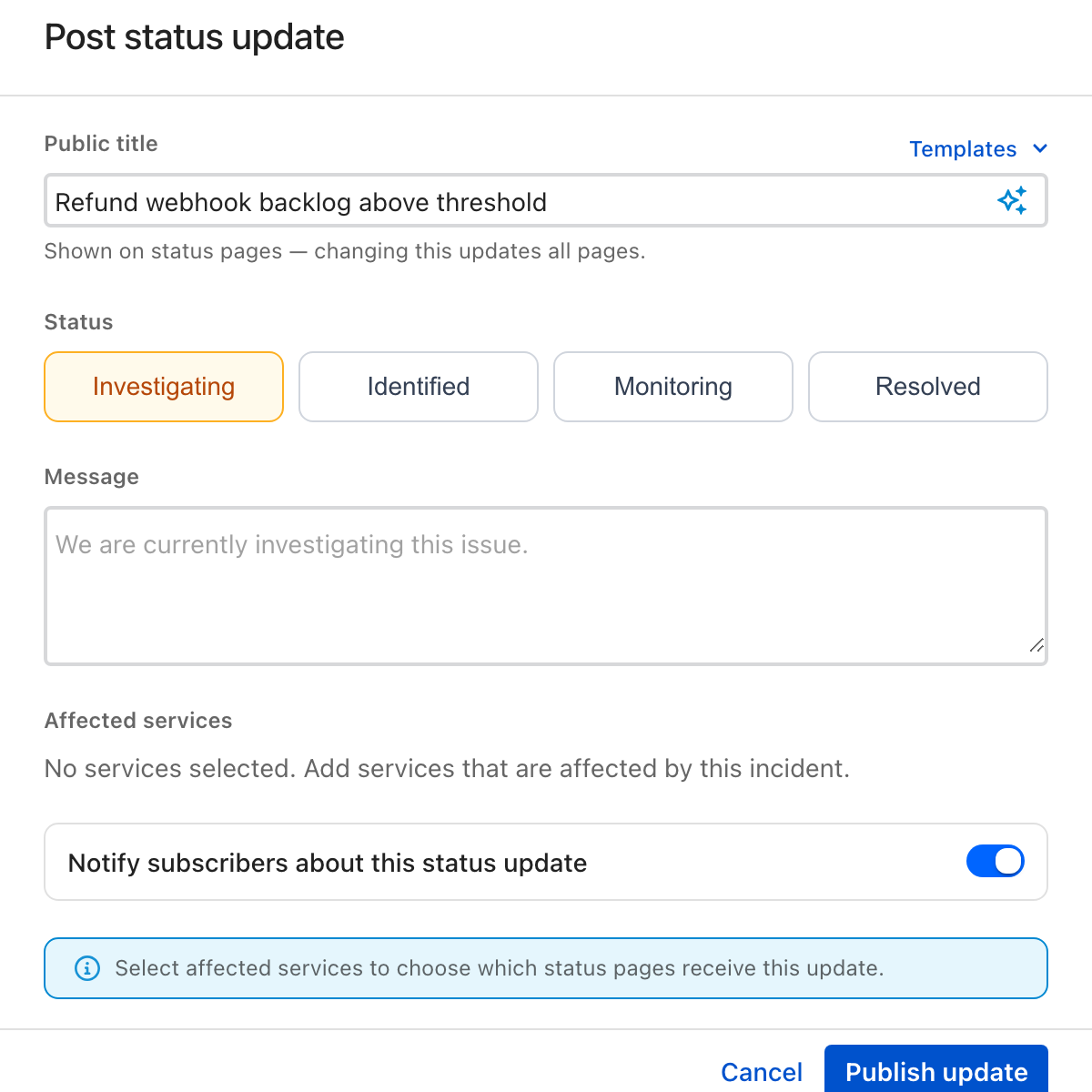
To post a status update, open an incident and click **Post status update**.

<figure><img src="/files/dgWdVxqWm5Coh8115Yus" alt="The Post status update dialog"><figcaption><p>Posting a status update from an incident</p></figcaption></figure>

A status update has the following fields:

| Field                  | Description                                                                                                                                          |
| ---------------------- | ---------------------------------------------------------------------------------------------------------------------------------------------------- |
| **Public title**       | The customer-facing title shown on your status pages. It is set on the first update and shared across all pages the incident appears on.             |
| **Status**             | The public status of the incident: **Investigating**, **Identified**, **Monitoring**, or **Resolved**.                                               |
| **Message**            | The public-facing text of the update. You can draft it with [ilert AI](/incidents-and-status-pages/status-updates/generating-incidents-using-ai.md). |
| **Affected services**  | The services impacted by the update, each with an impact level. The impact level determines the public status shown on your status pages.            |
| **Notify subscribers** | Whether to notify subscribers of the affected services and status pages about this update.                                                           |

When you publish the update, ilert posts it to every status page that includes at least one of the affected services and—if enabled—notifies subscribers.

{% hint style="info" %}
The public status of a service on a status page changes only when a status update is posted. Declaring an incident or changing its affected services updates ilert internally, but nothing is shown publicly until you post a status update.
{% endhint %}

### Resolving an incident publicly

When the incident is over, post a status update with the status **Resolved**. The affected services return to **Operational** on every status page the update is published to, and subscribers are notified that the issue has been resolved.

## Incident templates

Create incident templates to:

* use as a starting point when posting status updates, and
* automatically create status updates using [alert source automation rules](/incidents-and-status-pages/services.md#automation-with-alert-sources).

When you post a status update, you can select one of your templates and all fields will be pre-filled using the values from the template.

![](/files/J7FHw6MCGKuoBKcS0gLD)

### Create an incident template <a href="#create-an-incident-template" id="create-an-incident-template"></a>

1. Go to **Incident comms** or **Status pages** (depending on your pricing plan) and click on the **Incident templates** tab.
2. Click on **Create new template**.
3. Give the template a name and fill out the fields that you would like to have pre-filled.
4. Click **Create template**.

### Using alert placeholders in incident templates <a href="#use-an-incident-template" id="use-an-incident-template"></a>

When a status update is created from an alert (**using alert source automation rules**), placeholder variables are substituted with their corresponding values. To use a variable in your template, include it in double braces, like this: `New status update for service {{serviceName}}`.

The following variables are available for substitution:

| Variable               | Description                                                                                                                                                                                                                                |
| ---------------------- | ------------------------------------------------------------------------------------------------------------------------------------------------------------------------------------------------------------------------------------------ |
| `serviceId`            | The id of the service that is affected                                                                                                                                                                                                     |
| `serviceName`          | The name of the service that is affected                                                                                                                                                                                                   |
| `serviceDescription`   | The description of the service that is affected                                                                                                                                                                                            |
| `serviceStatus`        | The **new** status of the service that is affected                                                                                                                                                                                         |
| `serviceStatusOld`     | The **old**/current status of the service that is affected                                                                                                                                                                                 |
| `teamNames`            | A comma separated list of team names. This corresponds to the same value that is shown in the teams field of an incident and is resolved by traversing the ownerships of the affected service and the alert source that created the alert. |
| `alertId`              | The id of the alert that triggered this status update                                                                                                                                                                                      |
| `alertDetails`         | The details of the alert that triggered this status update                                                                                                                                                                                 |
| `alertSummary`         | The summary of the alert that triggered this status update                                                                                                                                                                                 |
| `alertStatus`          | The status of the alert that triggered this status update                                                                                                                                                                                  |
| `alertPriority`        | The priority of the alert that triggered this status update                                                                                                                                                                                |
| `alertSourceId`        | The id of the alert source of the alert that triggered this status update                                                                                                                                                                  |
| `alertSourceName`      | The name of the alert source of the alert that triggered this status update                                                                                                                                                                |
| `escalationPolicyId`   | The id of the escalation policy of the alert that triggered this status update                                                                                                                                                             |
| `escalationPolicyName` | The name of the escalation policy of the alert that triggered this status update                                                                                                                                                           |


---

# Agent Instructions: Querying This Documentation

If you need additional information that is not directly available in this page, you can query the documentation dynamically by asking a question.

Perform an HTTP GET request on the current page URL with the `ask` query parameter:

```
GET https://docs.ilert.com/incidents-and-status-pages/status-updates.md?ask=<question>
```

The question should be specific, self-contained, and written in natural language.
The response will contain a direct answer to the question and relevant excerpts and sources from the documentation.

Use this mechanism when the answer is not explicitly present in the current page, you need clarification or additional context, or you want to retrieve related documentation sections.
