> For the complete documentation index, see [llms.txt](https://docs.ilert.com/llms.txt). Markdown versions of documentation pages are available by appending `.md` to page URLs; this page is available as [Markdown](https://docs.ilert.com/integrations/deployment-integrations.md).

# Deployment integrations

Deployment pipelines receive events from your CI/CD tooling so ilert can show the reader what changed shortly before an alert fired.

A **deployment pipeline** is to deployment events what an alert source is to alerts: the object that receives them, holds the integration key they are routed by, and decides which of them are worth recording.

Its purpose is correlation. When an alert fires, ilert looks for deployments that landed shortly before it and attaches the closest ones to the alert, so the responder opens a page that already answers *what changed just now* — usually the first question anyone asks. See [Deployment events](/alerting/deployment-events.md) for how that matching works and how teams narrow it.

Every plan includes deployment events.

## Create a deployment pipeline

Every integration on this page starts here; only the vendor-side setup differs.

{% stepper %}
{% step %}

### Open the pipeline list

In the sidebar, go to **Alerting** → **Deployment events**, then select the **Deployment pipelines** tab. Click **Create new pipeline**.
{% endstep %}

{% step %}

### Name it and choose a type

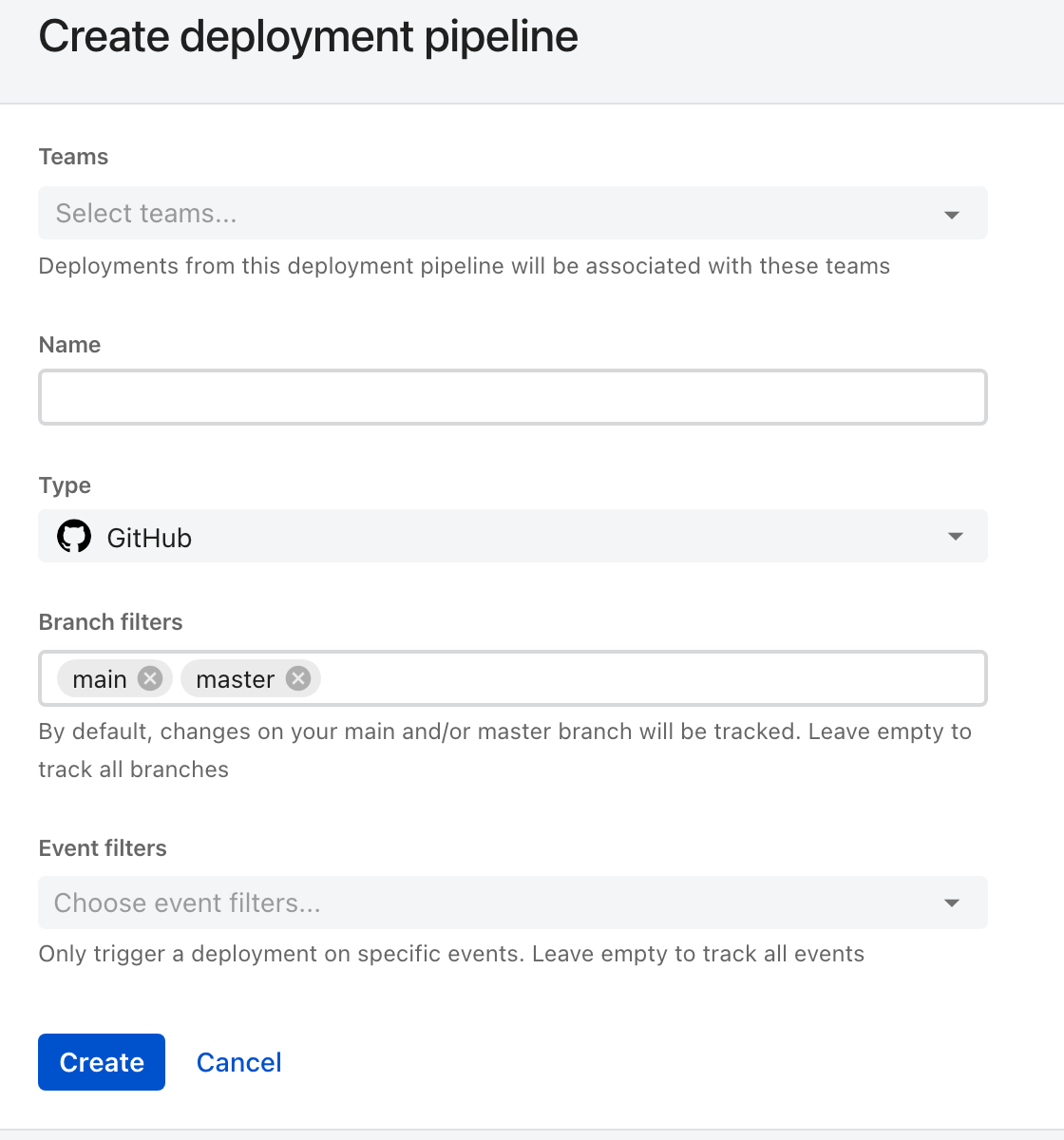
<figure><img src="https://3394882078-files.gitbook.io/~/files/v0/b/gitbook-x-prod.appspot.com/o/spaces%2F-M76ygPnS4HUcFSX8ulm%2Fuploads%2Fgit-blob-e9bbe0df07eabd8fd339f5374e84def526ed285d%2Fdeployment-pipeline-create.png?alt=media" alt="The Create deployment pipeline form in ilert, with Teams, Name and Type fields, Type set to GitHub, Branch filters prefilled with the chips main and master, and an empty Event filters field."><figcaption><p><strong>Type</strong> decides the rest of the form. With GitHub chosen it grows branch and event filters — and the branch filter arrives already populated.</p></figcaption></figure>

| Field     | What it does                                                                                                                                   |
| --------- | ---------------------------------------------------------------------------------------------------------------------------------------------- |
| **Teams** | Which [teams](/users-and-access-management/teams.md) own the pipeline. This is also what lets a team claim its own deployments for correlation |
| **Name**  | How the pipeline appears in the list and on correlated alerts                                                                                  |
| **Type**  | The tool sending the events. It cannot be changed after creation, and it governs which filters the form offers                                 |

{% hint style="warning" %}
**Branch filters start filled in.** A new GitHub, GitLab, or Azure DevOps pipeline arrives with `main` and `master` already in **Branch filters**, so events from every other branch are dropped without a trace. That is usually what you want. If it is not — you deploy from release branches, or want everything — clear the field: empty means all branches, not none.
{% endhint %}
{% endstep %}

{% step %}

### Create it and copy the URL

Click **Create**. The pipeline's detail view shows its **Integration key** and the webhook **URL** built from it. That URL is what you paste into the vendor.
{% endstep %}

{% step %}

### Send a deployment and confirm it arrived

Trigger whatever you configured — push a commit, publish a release — and check that a row appears under **Alerting** → **Deployment events**.

This step is not optional. The events API answers `202 Accepted` to *any* request, including one carrying an invalid integration key, so nothing on the sending side will tell you the pipeline never received it.
{% endstep %}
{% endstepper %}

## What each type supports

The **Type** you pick decides which filters exist, because a filter can only be built from what the vendor's payload actually carries.

| Type             | Branch filters | Event filters                                             | Setup                                                                                               |
| ---------------- | -------------- | --------------------------------------------------------- | --------------------------------------------------------------------------------------------------- |
| **GitHub**       | Yes            | Pull request (merged), Commit (push), Release (published) | [GitHub deployment pipeline](/integrations/deployment-integrations/github.md)                       |
| **GitLab**       | Yes            | Push hook, Merge request hook, Release hook               | [GitLab deployment pipeline](/integrations/deployment-integrations/gitlab.md)                       |
| **Azure DevOps** | Yes            | —                                                         | [Azure DevOps deployment pipeline](/integrations/deployment-integrations/azuredevops.md)            |
| **Argo CD**      | —              | —                                                         | [Argo CD deployment pipeline](/integrations/deployment-integrations/argo-cd-deployment-pipeline.md) |
| **API**          | —              | —                                                         | [API deployment pipeline](/integrations/deployment-integrations/api.md)                             |

Both filters are subtractive, and an **empty** filter means *keep everything* rather than *keep nothing*:

* **Branch filters** — a chip list of branch names. Prefilled with `main` and `master`.
* **Event filters** — a checkbox list of the vendor's event types. Empty by default, so everything the webhook sends is recorded.

Filtering in ilert rather than at the vendor is what makes one account-wide webhook workable: point every repository at one URL, then let each pipeline keep only what concerns it.

{% hint style="info" %}
Prefer **release** events where the tool offers them. They map one-to-one onto things you actually shipped, which is what makes a correlation meaningful. Push events from an account-wide webhook can arrive hundreds a day and correlate with everything and nothing.
{% endhint %}

## Manage a pipeline

The detail view carries three things worth knowing about:

* **Rotate key** issues a new integration key. The old one stops working immediately, so update the vendor's webhook in the same sitting.
* **Export to Terraform** emits the pipeline as a resource block, for accounts managed as code.
* **Integration guide** links back to the setup page for that type.

## In this section

<table data-card-size="large" data-view="cards"><thead><tr><th></th><th></th><th data-hidden data-card-target data-type="content-ref"></th></tr></thead><tbody><tr><td><strong>API deployment pipeline</strong></td><td>Post deployment events from anything that can make an HTTP request.</td><td><a href="/integrations/deployment-integrations/api.md">API deployment pipeline</a></td></tr><tr><td><strong>GitHub deployment pipeline</strong></td><td>A webhook or the ilert GitHub Action.</td><td><a href="/integrations/deployment-integrations/github.md">GitHub deployment pipeline</a></td></tr><tr><td><strong>GitLab deployment pipeline</strong></td><td>A group or project webhook.</td><td><a href="/integrations/deployment-integrations/gitlab.md">GitLab deployment pipeline</a></td></tr><tr><td><strong>Azure DevOps deployment pipeline</strong></td><td>A project service hook.</td><td><a href="/integrations/deployment-integrations/azuredevops.md">Azure DevOps deployment pipeline</a></td></tr><tr><td><strong>Argo CD deployment pipeline</strong></td><td>The notifications controller, for GitOps rollouts.</td><td><a href="/integrations/deployment-integrations/argo-cd-deployment-pipeline.md">Argo CD deployment pipeline</a></td></tr></tbody></table>


---

# Agent Instructions
This documentation is published with GitBook. GitBook is the documentation platform designed so that both humans and AI agents can read, navigate, and reason over technical content effectively. Learn more at gitbook.com.

## Querying This Documentation
If you need additional information that is not directly available in this page, you can query the documentation dynamically by asking a question.

Perform an HTTP GET request on the current page URL with the `ask` query parameter, and the optional `goal` query parameter:

```
GET https://docs.ilert.com/integrations/deployment-integrations.md?ask=<question>&goal=<endgoal>
```

`ask` is the immediate question: it should be specific, self-contained, and written in natural language.
`goal` is optional and describes the broader end goal you are ultimately trying to accomplish on behalf of the user. GitBook uses it to tailor the answer towards what is most useful for that goal.

The response will contain a direct answer to the question and relevant excerpts and sources from the documentation.

Use this mechanism when the answer is not explicitly present in the current page, you need clarification or additional context, or you want to retrieve related documentation sections.
