> For the complete documentation index, see [llms.txt](https://docs.ilert.com/llms.txt). Markdown versions of documentation pages are available by appending `.md` to page URLs; this page is available as [Markdown](https://docs.ilert.com/integrations/inbound-integrations/dbmarlin.md).
# DBmarlin Integration
Create alerts in ilert from DBmarlin alert rules — with ilert's DBmarlin inbound integration.
[DBmarlin](https://www.dbmarlin.com/) is a database observability and performance monitoring tool that tracks database instances, hosts, and the changes that affect them. Its alert rules watch statistics such as query time, executions, or host CPU and fire when a threshold is breached. With this integration, DBmarlin alert rules automatically create alerts in ilert, so the right responders are notified and escalations happen reliably.
## In ilert: Create a DBmarlin alert source
1. Go to **Alerting** → **Alert sources** and click **Create new alert source**.
2. Search for **DBmarlin**, click its tile, and click **Next**.
3. Give your alert source a name, optionally assign teams, and click **Next**.
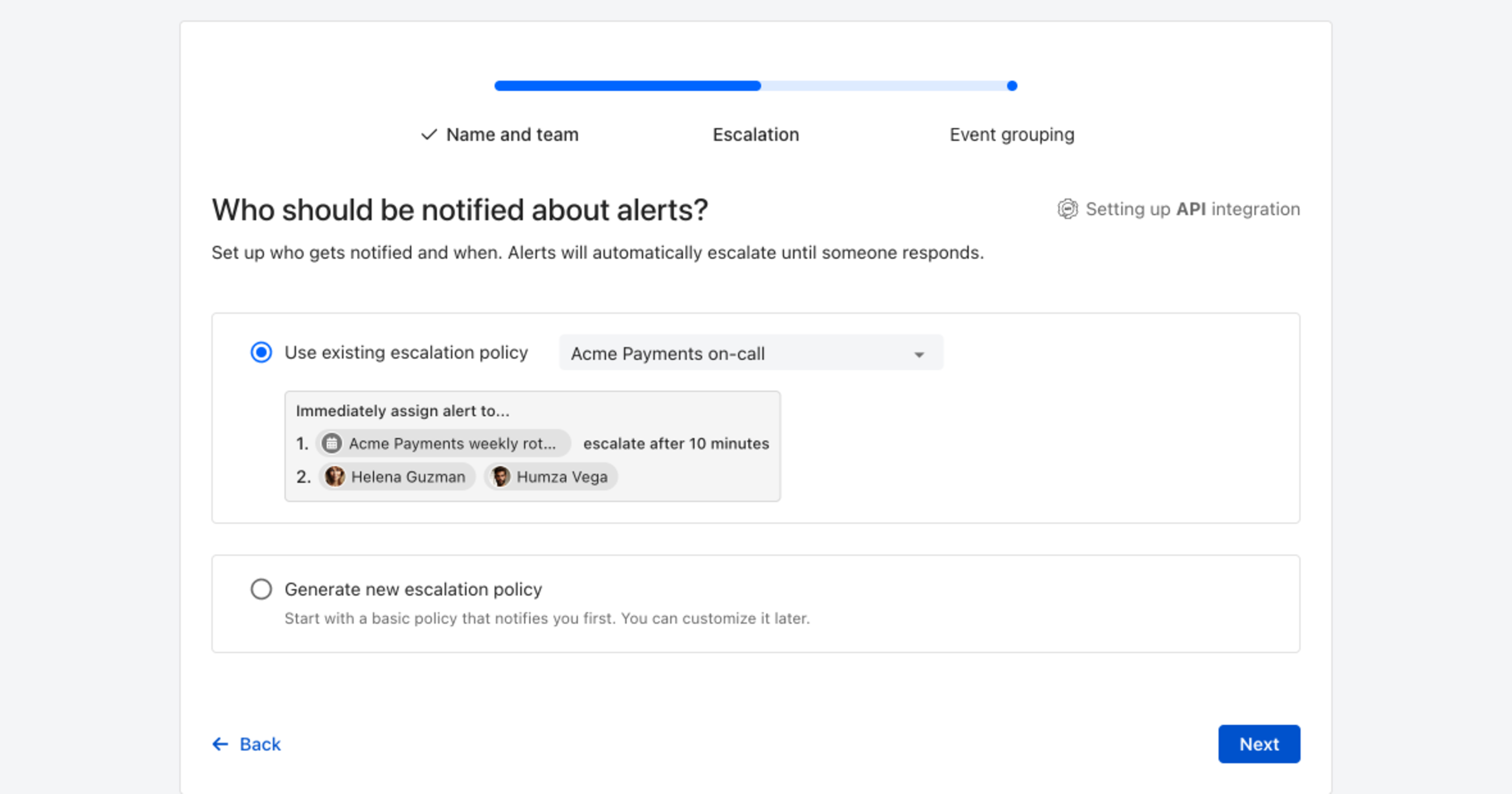
4. Choose who gets notified: select **Use existing escalation policy** and pick a policy, or **Generate new escalation policy** to start with a basic one that notifies you first. Click **Next**.
Pick an existing escalation policy, or generate a basic one without leaving the wizard.
5. Select **Default grouping** and click **Continue setup**. It groups events by the alert key the integration sets; the other [grouping options](/alerting/configure-alerting/alert-sources.md#event-grouping) are easier to judge once events are arriving.
6. The next page shows more settings, such as notification priority and alert templates. Click **Finish setup** for now; you can change them later.
7. On the final page, ilert generates a webhook URL for your alert source in the form `https://api.ilert.com/api/v1/events/dbmarlin/`. Copy it — you will need it in the next section. You can find it again later under the alert source's **Settings** tab.
## In DBmarlin: Enable the Webhook integration
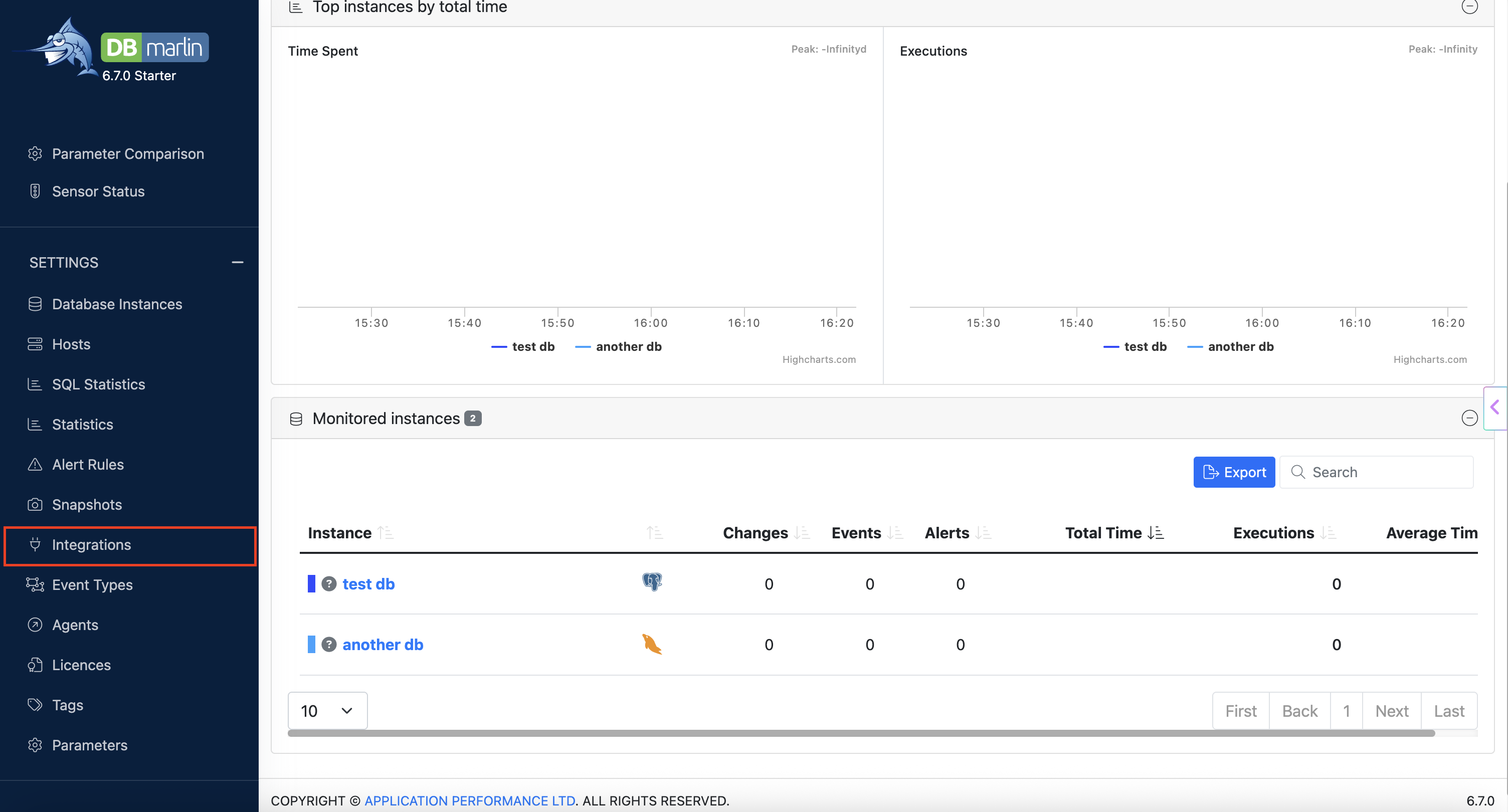
1. In the DBmarlin sidebar, go to **Settings** --> **Integrations**.
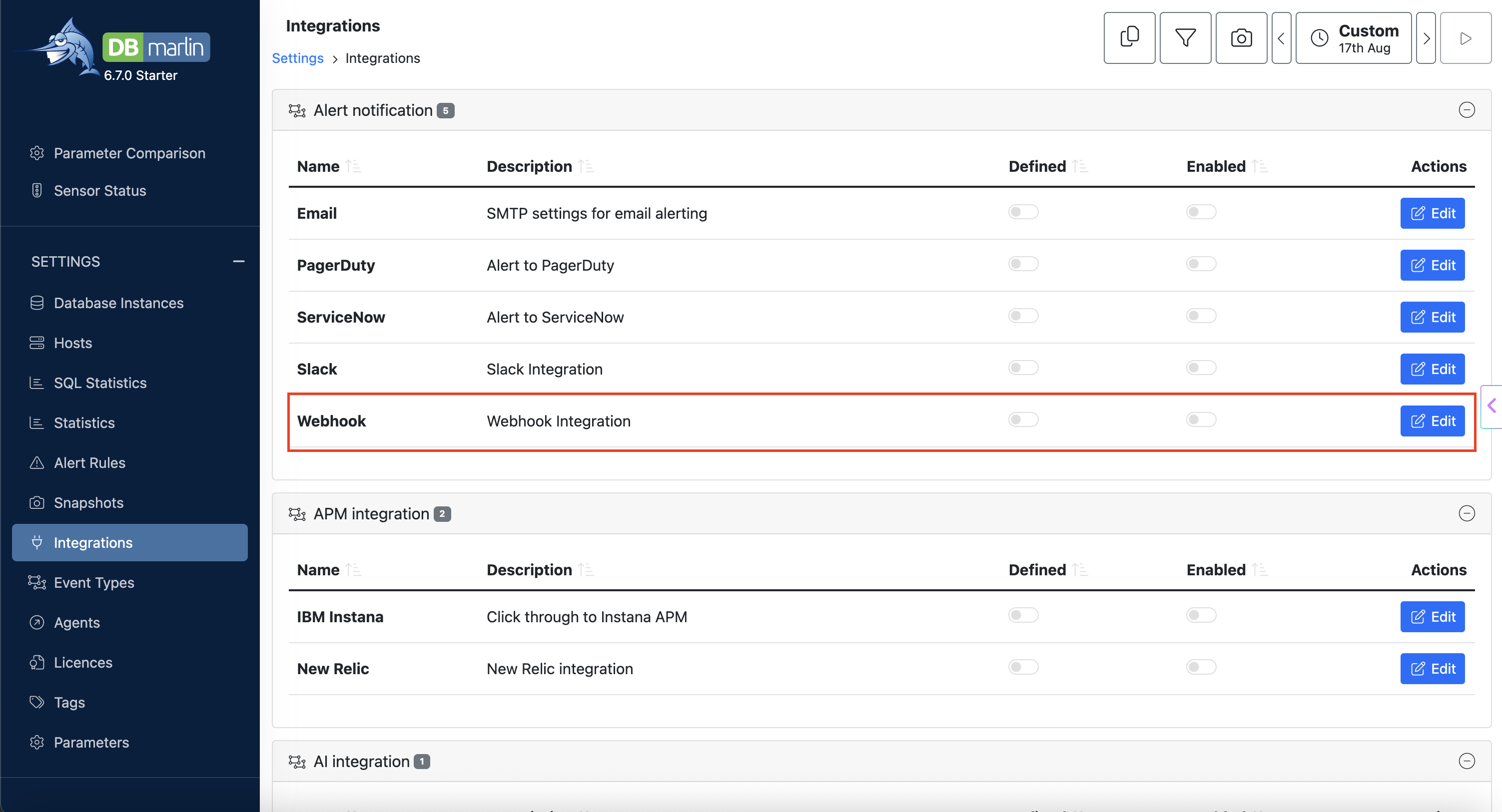
2. In the **Alert notification** section, find the **Webhook** row and click on **Edit**.
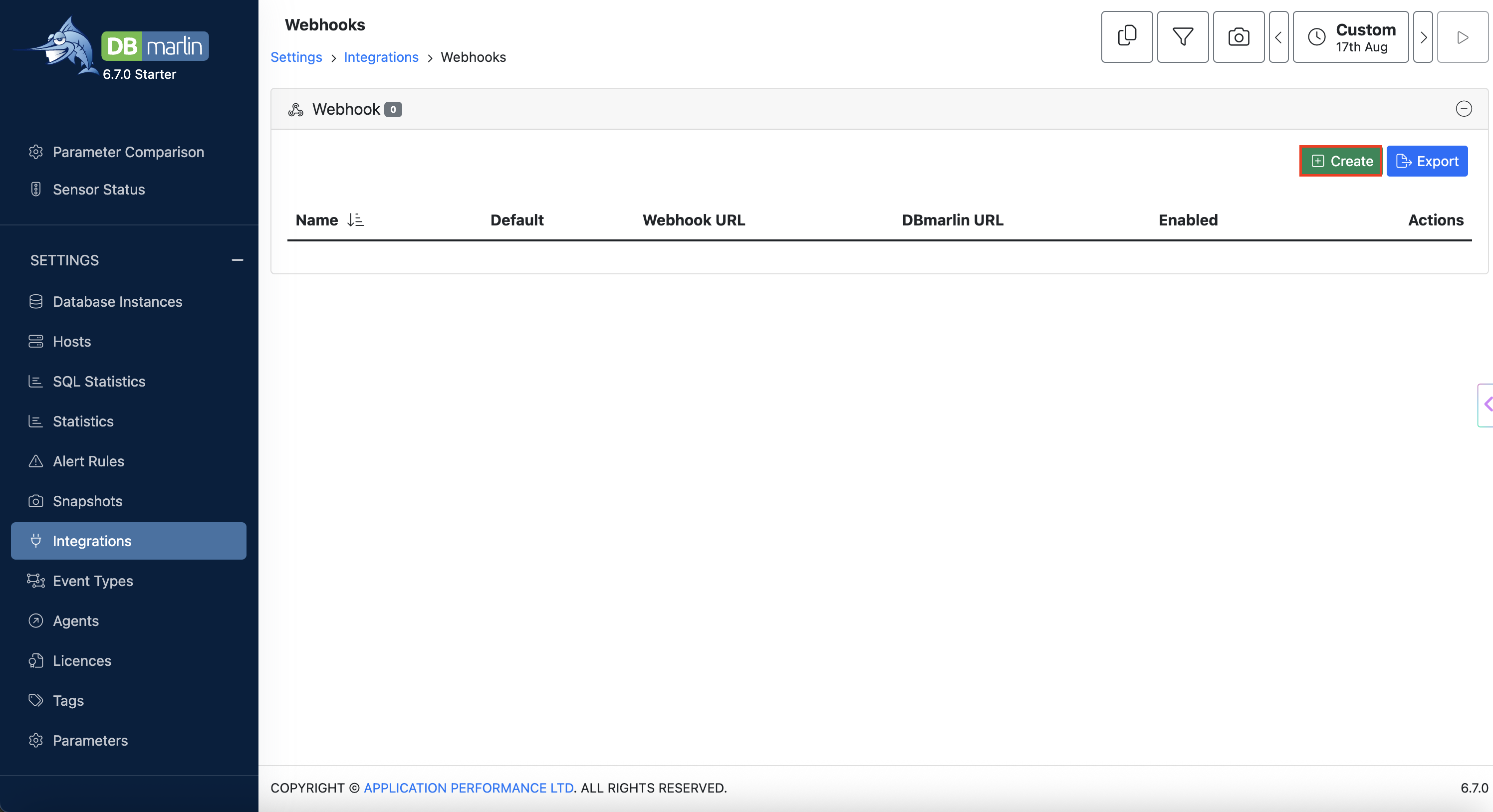
3. Click on **Create** to add a new webhook integration.
## In DBmarlin: Create the ilert webhook
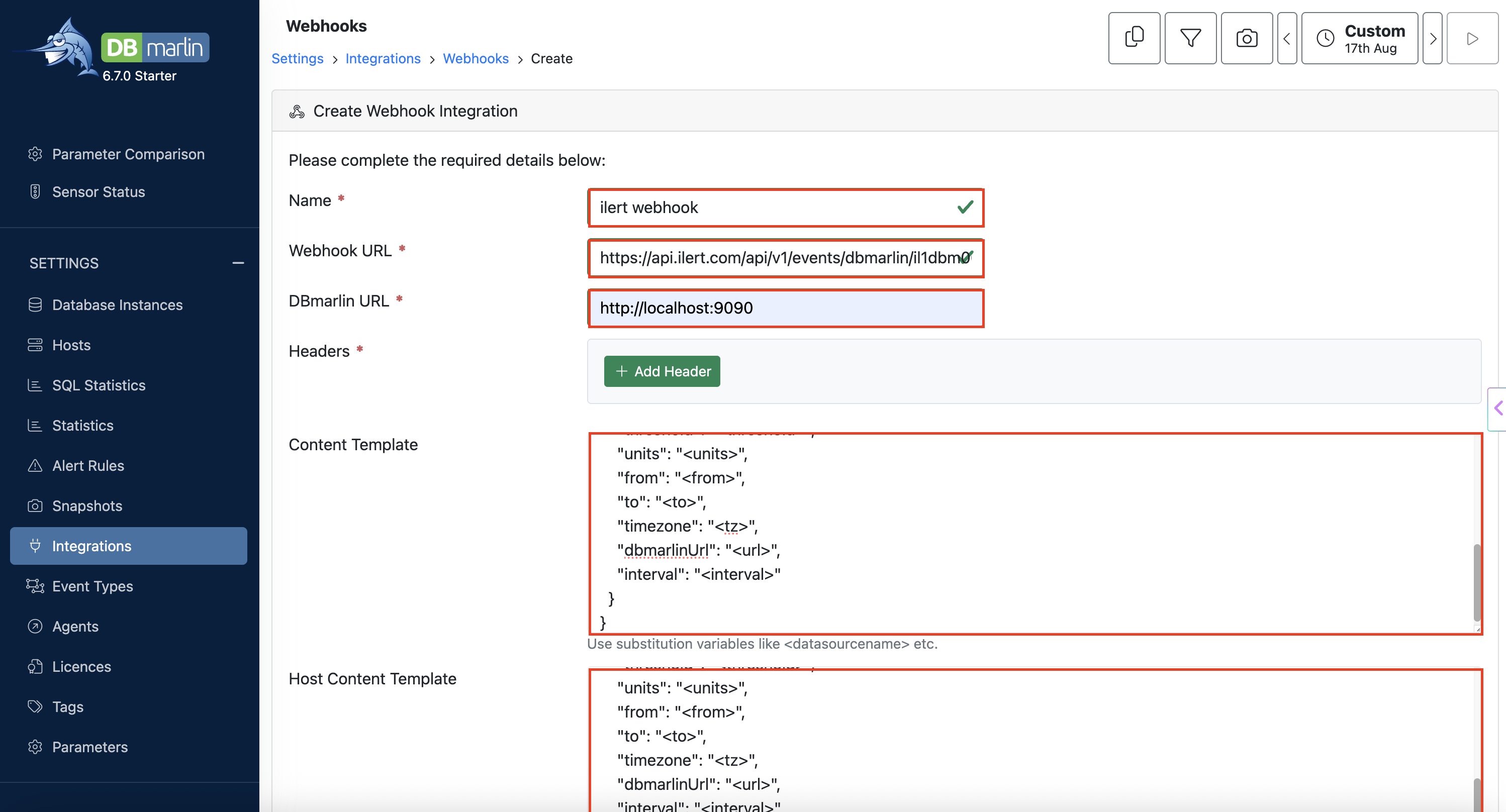
Fill in the **Create Webhook Integration** form:
* **Name**: a name for the webhook, for example `ilert webhook`
* **Webhook URL**: the webhook URL you copied from your ilert alert source
* **DBmarlin URL**: the base URL of your DBmarlin installation, for example `http://localhost:9090`. DBmarlin uses it to build the deep link that is sent to ilert as `dbmarlinUrl`, so responders can jump straight from the ilert alert into DBmarlin.
* **Headers**: click on **Add Header** and add `Content-Type` with the value `application/json`
* **Content Template**: the payload for database instance alert rules — copy and paste the template from [Content template](#content-template) below
* **Host Content Template**: the payload for host alert rules — copy and paste the template from [Host content template](#host-content-template) below
Then save the webhook and make sure both the webhook itself and the **Webhook** integration on the **Integrations** page are toggled to **Enabled**.
Finally, attach the webhook to your alert rules: mark it as **Default** so every alert rule uses it, or select it on individual rules under **Settings** --> **Alert Rules**.
### Content template
Used for alert rules on database instances. The `datasourceName` field carries the name of the monitored instance.
```json
{
"body": {
"datasourceName": "",
"hostname": "",
"severity": "3",
"summary": ": ",
"ruleId": "",
"ruleName": "",
"statistic": "",
"oldValue": "",
"newValue": "",
"threshold": "",
"units": "",
"from": "",
"to": "",
"timezone": "",
"dbmarlinUrl": "",
"interval": ""
}
}
```
### Host content template
Used for alert rules on hosts. Instead of `datasourceName` it carries `eventType`, which DBmarlin populates with the substitution variable `` — that is, whether the alert condition started or ended.
```json
{
"body": {
"eventType": "",
"hostname": "",
"severity": "3",
"summary": ": ",
"ruleId": "",
"ruleName": "",
"statistic": "",
"oldValue": "",
"newValue": "",
"threshold": "",
"units": "",
"from": "",
"to": "",
"timezone": "",
"dbmarlinUrl": "",
"interval": ""
}
}
```
{% hint style="info" %}
Both templates use DBmarlin substitution variables such as ``, ``, or ``, which DBmarlin replaces at send time. You can adapt them freely — for example set a different `severity`, change the `summary`, or add your own fields. Extra fields show up as custom details on the ilert alert.
{% endhint %}
When an alert rule fires, DBmarlin renders the matching template and posts it to ilert, which creates an alert.
## FAQ
#### **Will alerts in ilert be resolved automatically?**
Yes, for alert rules that send the `eventType` field: ilert resolves the corresponding alert as soon as DBmarlin sends the event with `eventType` set to `ended`. This field is part of the host content template. If you also want database instance alerts to resolve automatically, add `"eventType": "",` to the content template.
#### **The ilert alert does not link back to DBmarlin. What is wrong?**
Check the **DBmarlin URL** field of the webhook. It must be a URL that your responders can actually reach — `http://localhost:9090` only works on the DBmarlin host itself, so use the externally reachable hostname of your DBmarlin installation instead.
---
# Agent Instructions
This documentation is published with GitBook. GitBook is the documentation platform designed so that both humans and AI agents can read, navigate, and reason over technical content effectively. Learn more at gitbook.com.
## Querying This Documentation
If you need additional information that is not directly available in this page, you can query the documentation by asking a question.
Perform an HTTP GET request on the following URL with the `ask` and `goal` query parameters:
```
GET https://docs.ilert.com/integrations/inbound-integrations/dbmarlin.md?ask=&goal=
```
`ask` is the immediate question: it should be specific, self-contained, and written in natural language.
`goal` is what the user is ultimately trying to achieve, the reason they need the answer. Sharing it helps GitBook give you a better, more relevant answer. A goal is most helpful when it describes the outcome the user wants rather than restating the question. For example, with `ask=how do I create an API token`, a goal like `automate deployments from our CI pipeline` lets GitBook tailor the answer to that use case.
The response will contain a direct answer to the question and relevant excerpts and sources from the documentation.
Use this mechanism when the answer is not explicitly present in the current page, you need clarification or additional context, or you want to retrieve related documentation sections.