> For the complete documentation index, see [llms.txt](https://docs.ilert.com/llms.txt). Markdown versions of documentation pages are available by appending `.md` to page URLs; this page is available as [Markdown](https://docs.ilert.com/integrations/inbound-integrations/opennms.md).

# OpenNMS Integration

[OpenNMS](https://www.opennms.com/) is an open-source network monitoring and management platform that discovers your infrastructure, collects performance data, and turns events into alarms. With the ilert OpenNMS plugin, alarms are forwarded to ilert as alerts, so your on-call team is notified through SMS, phone calls, and push notifications, while acknowledging or clearing the alarm in OpenNMS keeps the ilert alert in sync.

## System requirements <a href="#requirements" id="requirements"></a>

* OpenNMS Horizon 35 (or higher)
* Shell access to the OpenNMS server and access to the [Karaf console](https://opennms.discourse.group/t/karaf-cli-cheat-sheet/149) over SSH on port `8101`, default password `admin`. From the OpenNMS host, or from anywhere the port is published, use `ssh admin@localhost -p 8101`. On the Docker image, run `docker exec -it <container> ssh admin@localhost -p 8101` unless you publish `8101` on the host
* JDK 17 and Maven, only if you build the plugin from source instead of downloading a release

{% hint style="warning" %}
The plugin is built against OpenNMS Integration API `2.0.0`, which Horizon ships since version 35. It does not load on anything older.
{% endhint %}

## Locate your OpenNMS install root <a href="#opennms-home" id="opennms-home"></a>

This guide writes paths as `$OPENNMS_HOME`, which is the OpenNMS install root. The packages do not export that variable, so it is empty in a normal login shell: a command pasted as-is writes to `/deploy/` at the filesystem root instead of into OpenNMS, and the plugin is never picked up. Look up your root and copy it before you continue.

| Installation            | Install root         |
| ----------------------- | -------------------- |
| RPM or Debian package   | `/usr/share/opennms` |
| Docker image or tarball | `/opt/opennms`       |

{% hint style="warning" %}
With the Docker image, the install root is a path **inside** the container, so `$OPENNMS_HOME` on the host points at nothing. Every path below that starts with `$OPENNMS_HOME` is a path in the container: read and write it with `docker exec` or `docker cp` and spell it out as `/opt/opennms`. The deploy step and the upgrade FAQ give the Docker form explicitly.
{% endhint %}

## In ilert: Create an OpenNMS alert source <a href="#create-alert-source" id="create-alert-source"></a>

1. Go to **Alerting** → **Alert sources** and click **Create new alert source**.
2. Search for **OpenNMS**, click its tile, and click **Next**.
3. Give your alert source a name, optionally assign teams, and click **Next**.
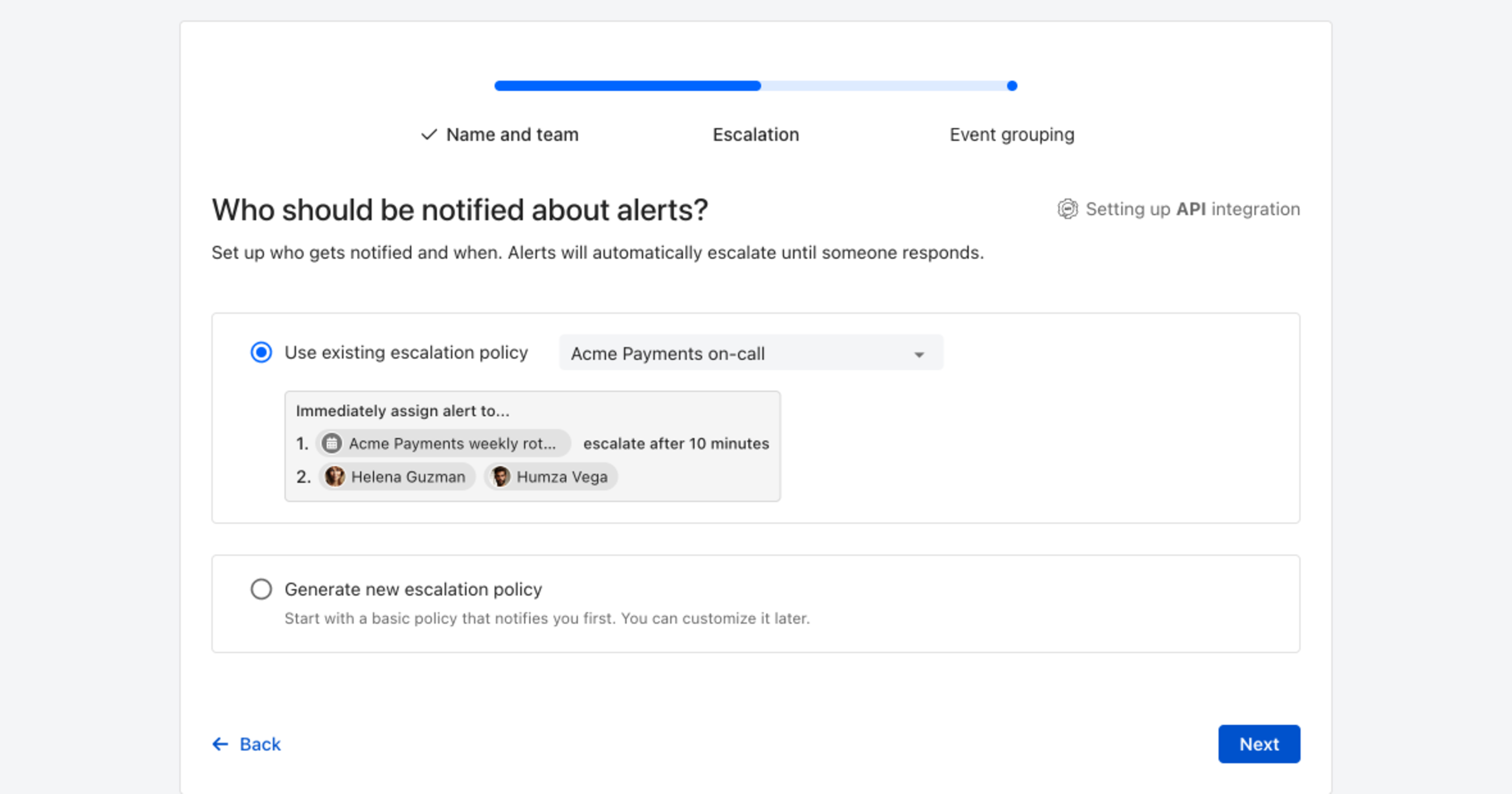
4. Choose who gets notified: select **Use existing escalation policy** and pick a policy, or **Generate new escalation policy** to start with a basic one that notifies you first. Click **Next**.

   <figure><img src="https://3394882078-files.gitbook.io/~/files/v0/b/gitbook-x-prod.appspot.com/o/spaces%2F-M76ygPnS4HUcFSX8ulm%2Fuploads%2Fgit-blob-8a281bf3931f5a1a531951ce97984d50989dd875%2Falert-source-escalation-step.png?alt=media" alt="The escalation step of the ilert alert source wizard, headed Who should be notified about alerts, with an escalation policy selected and a preview of its escalation rules below."><figcaption><p>Pick an existing escalation policy, or generate a basic one without leaving the wizard.</p></figcaption></figure>
5. Select **Default grouping** and click **Continue setup**. It groups events by the alert key the integration sets; the other [grouping options](/alerting/configure-alerting/alert-sources.md#event-grouping) are easier to judge once events are arriving.
6. The next page shows more settings, such as notification priority and alert templates. Click **Finish setup** for now; you can change them later.
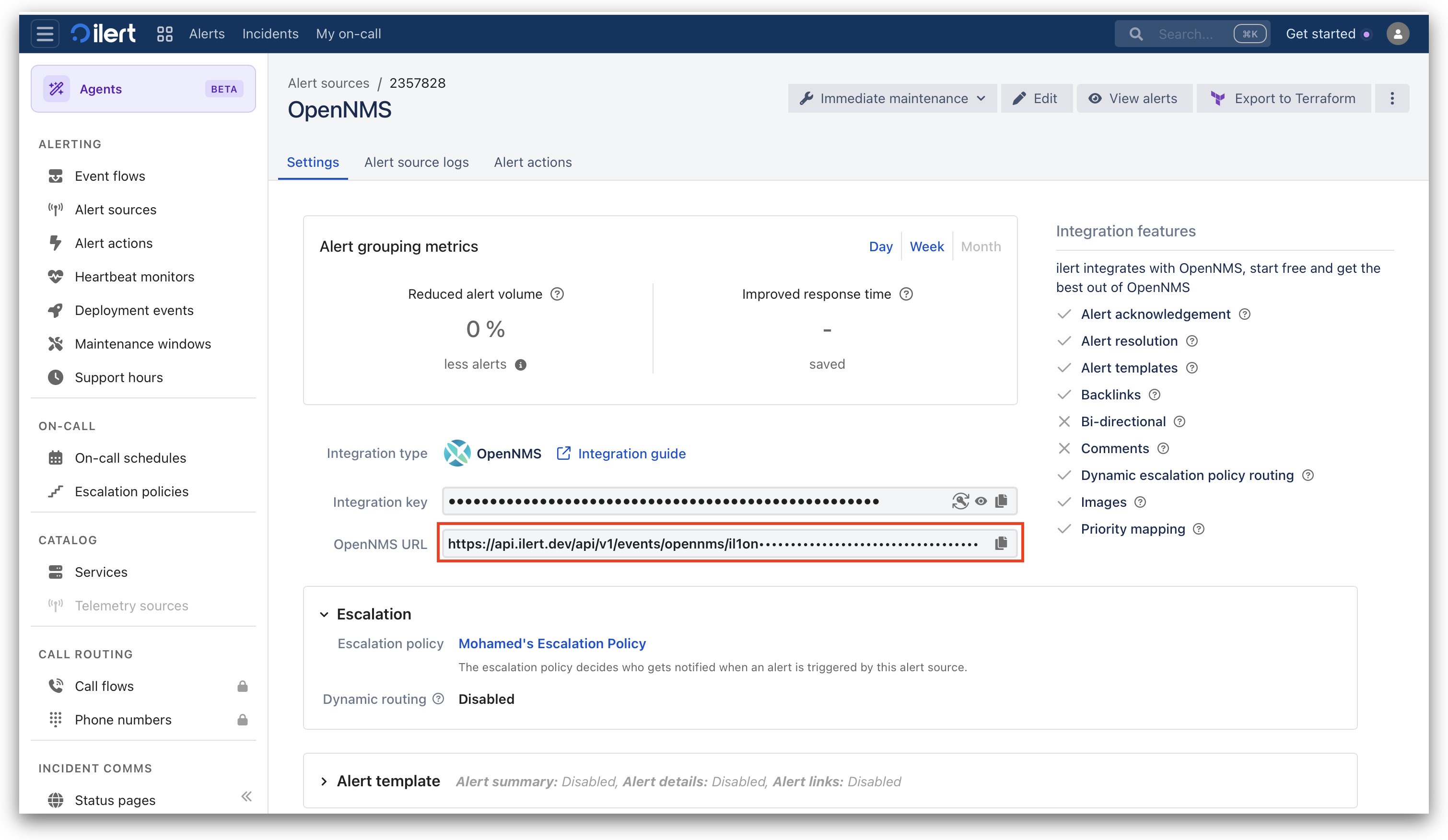
7. On the final page, copy the generated **events URL** verbatim. You will use it to configure the plugin on the OpenNMS server. It looks like this:

```
https://api.ilert.com/api/v1/events/opennms/<your-integration-key>
```

<figure><img src="https://3394882078-files.gitbook.io/~/files/v0/b/gitbook-x-prod.appspot.com/o/spaces%2F-M76ygPnS4HUcFSX8ulm%2Fuploads%2Fgit-blob-7916ad4f7d317398646366362cffb2acdf12fcee%2Fopennms-01-ilert-alert-source-url.png?alt=media" alt=""><figcaption></figcaption></figure>

{% hint style="warning" %}
The integration key is part of the events URL, so the URL is both the address and the credential. There is no separate API key to configure. Treat the URL like a password, since anyone who has it can create alerts in your account. For this reason, the plugin never writes it to its log, not even at `DEBUG` level.
{% endhint %}

If different classes of alarm should reach different teams, create one alert source per team. Each one gets its own events URL, and you repeat the [alert source settings](#alert-source-settings) once per alert source with a different filter.

## In OpenNMS: Install the plugin <a href="#installation-guide" id="installation-guide"></a>

### Get the plugin

Download `opennms-ilert-plugin.tar.gz` from the [releases page](https://github.com/iLert/ilert-opennms/releases) of the ilert OpenNMS plugin and unpack it. Besides the `.kar` file, the archive contains the license and `shasum256.txt`, so you can verify the download:

```bash
tar xzf opennms-ilert-plugin.tar.gz
shasum -a 256 -c shasum256.txt
```

Alternatively, build the plugin yourself, which requires JDK 17 and Maven:

```bash
git clone https://github.com/iLert/ilert-opennms.git
cd ilert-opennms
make
```

The kar is created in `assembly/kar/target/`. Two kars land there: take `opennms-ilert-plugin-<version>.kar`, which is around 6 MB. The 3 KB `org.opennms.plugins.ilert.assembly.kar-<version>.kar` next to it is a Maven artifact, not the plugin, and deploying it installs nothing.

### Deploy the plugin

Either way you end up with a file named `opennms-ilert-plugin-<version>.kar`. Copy it into the OpenNMS deploy directory, then tell Karaf to install the feature on every boot.

{% tabs %}
{% tab title="Package or tarball" %}

```bash
sudo cp opennms-ilert-plugin-<version>.kar $OPENNMS_HOME/deploy/

echo 'opennms-plugins-ilert wait-for-kar=opennms-ilert-plugin-<version>' | sudo tee $OPENNMS_HOME/etc/featuresBoot.d/ilert.boot
```

{% endtab %}

{% tab title="Docker" %}
`sudo cp` and `sudo tee` write to the host filesystem, not into the container, so neither works here. Move both files in with `docker cp` instead, against the literal `/opt/opennms` root:

```bash
docker cp opennms-ilert-plugin-<version>.kar <container>:/opt/opennms/deploy/

echo 'opennms-plugins-ilert wait-for-kar=opennms-ilert-plugin-<version>' > ilert.boot
docker cp ilert.boot <container>:/opt/opennms/etc/featuresBoot.d/ilert.boot
```

`docker cp` writes to the container's own layer, so both files are gone the next time the container is recreated. Keep `deploy/` and `etc/` on volumes, or bake the kar and the boot file into your image, if the plugin has to survive an image update.
{% endtab %}
{% endtabs %}

{% hint style="warning" %}
The `wait-for-kar` value must match the filename of your `.kar` file without the `.kar` extension, including the version. `kar:list` in the Karaf console prints the name that Karaf actually registered. If the two do not match, the feature does not come up on boot and you have to install it manually after every restart.
{% endhint %}

Restart OpenNMS to pick up the plugin, or `docker restart <container>` on the Docker image. To avoid the restart, install the feature from the Karaf console instead. The boot file still makes sure that it survives future restarts:

```
feature:install opennms-plugins-ilert
```

### Confirm the installation

Confirm that the feature is `Started` and the bundle is `Active`:

```
karaf@root()> feature:list -i | grep ilert
opennms-plugins-ilert │ 1.0.0 │ x │ Started │ opennms-plugins-ilert-features

karaf@root()> bundle:list -s | grep ilert
546 │ Active │ 80 │ 1.0.0 │ org.opennms.plugins.ilert-plugin
```

{% hint style="info" %}
If the bundle is listed as `Installed` instead of `Active`, it failed to resolve. Run `bundle:diag <id>` to see the unsatisfied requirement.
{% endhint %}

Nothing is forwarded yet, since the plugin has no alert source configured. That is the next step.

## In OpenNMS: Configure the plugin <a href="#configuration" id="configuration"></a>

### Alert source settings

Each ilert alert source is one plugin service with its own URL, filter, and hold-down delay. Create it from the Karaf console:

```
config:edit --alias production --factory org.opennms.plugins.ilert.services
property-set url https://api.ilert.com/api/v1/events/opennms/<your-integration-key>
property-set jexlFilter 'alarm.severity.id >= 6'
config:update
```

The `--alias` is only a label for this service and becomes part of the filename. The command above writes `$OPENNMS_HOME/etc/org.opennms.plugins.ilert.services-production.cfg`, and you can create that file yourself instead:

```properties
url = https://api.ilert.com/api/v1/events/opennms/<your-integration-key>
jexlFilter = alarm.severity.id >= 6
```

Either way, the change takes effect within seconds and does not require a restart. Repeat this step once per ilert alert source, giving each a different `--alias`.

| Property        | Required         | Meaning                                                                                                                                       |
| --------------- | ---------------- | --------------------------------------------------------------------------------------------------------------------------------------------- |
| `url`           | yes              | The events URL you copied in ilert. A service without a `url` does not start and logs an error.                                               |
| `jexlFilter`    | in practice, yes | Which alarms this service forwards. Without a filter, nothing is forwarded: the plugin logs a warning and stays idle.                         |
| `holdDownDelay` | no               | An ISO-8601 duration such as `PT5M`, which delays alerts so that alarms clearing inside the window never page. Absent means send immediately. |

### Global settings

Every ilert alert carries a link back to the alarm in OpenNMS. The link defaults to `127.0.0.1`, which is of no use on a responder's phone, so set it to a URL your team can actually reach. These settings apply to the whole OpenNMS instance, not to a single alert source:

```
config:edit org.opennms.plugins.ilert
property-set alarmDetailsUrlPattern 'https://onms.example.com/opennms/alarm/detail.htm?id=%d'
property-set client 'OpenNMS Production'
config:update
```

| Property                 | Default                                                | Meaning                                                                                                                   |
| ------------------------ | ------------------------------------------------------ | ------------------------------------------------------------------------------------------------------------------------- |
| `alarmDetailsUrlPattern` | `http://127.0.0.1:8980/opennms/alarm/detail.htm?id=%d` | Deep link to the alarm. Must contain exactly one `%d` for the alarm ID; a literal percent sign has to be escaped as `%%`. |
| `client`                 | `OpenNMS`                                              | The label shown on that link in ilert. Worth changing if you run more than one OpenNMS instance.                          |

A malformed pattern does not stop alerts. The plugin logs the problem once at startup and sends alerts without the link instead of not sending them at all.

### Choose which alarms are forwarded

`jexlFilter` is a [JEXL](https://commons.apache.org/proper/commons-jexl/reference/syntax.html) expression that is evaluated per alarm. The alarm is bound to the variable `alarm`, and any getter on the OpenNMS `Alarm` model is reachable as a property. The expression must evaluate to a boolean. An expression that throws, or that returns something else, drops the alarm and logs a warning.

Some starting points:

```javascript
// Anything major or worse. Severity IDs: 1 indeterminate, 2 cleared, 3 normal,
// 4 warning, 5 minor, 6 major, 7 critical.
alarm.severity.id >= 6

// The same filter written by name, if you find that easier to read
alarm.severity == 'MAJOR' || alarm.severity == 'CRITICAL'

// Only alarms bound to a node in a particular category
alarm.node != null && alarm.node.categories.contains("Production")

// A specific class of problem
alarm.reductionKey =~ ".*nodeLostService.*"

// Everything except a noisy UEI
!(alarm.reductionKey =~ ".*/snmp/.*")

// Everything, which is useful while testing but too noisy to leave in place
alarm.reductionKey =~ ".*"
```

The plugin ships a Karaf command that runs an expression against the alarms currently in your database, so you can see what a filter would have caught without waiting for the next outage:

```
karaf@root()> opennms-ilert:eval-jexl 'alarm.severity.id >= 6'
MATCHED: ImmutableAlarm{id=17, reductionKey='uei.opennms.org/nodes/nodeDown::1', ...}

3 of 128 alarm(s) matched.
```

| Option    | Effect                                                                                       |
| --------- | -------------------------------------------------------------------------------------------- |
| `-c`      | Report only the count, which is useful for sizing a filter against a busy database.          |
| `-p`      | Print the ilert payload that each matching alarm would produce, without the alarm deep link. |
| `-a <id>` | Evaluate against a single alarm by ID and report whether that alarm would be forwarded.      |

`-a` is the fastest way to find out why a specific alarm did not page. Here a minor `nodeLostService` alarm falls below a major-and-above filter:

```
karaf@root()> opennms-ilert:eval-jexl -a 42 'alarm.severity.id >= 6'
Alarm 42 has reduction key 'uei.opennms.org/nodes/nodeLostService::1:10.99.0.1:ICMP'.
The expression evaluates to false, so this alarm would not be forwarded.
```

### Alert priority

The plugin derives the priority of the ilert alert from the severity of the alarm. The mapping is fixed and there is no plugin setting for it:

| Alarm severity                                           | ilert priority |
| -------------------------------------------------------- | -------------- |
| `CRITICAL`, `MAJOR`                                      | High           |
| `INDETERMINATE`, `CLEARED`, `NORMAL`, `WARNING`, `MINOR` | Low            |

Priority decides how the alert notifies: a high priority alert runs your escalation policy, while a [low priority alert](/alerting/configure-alerting/alert-sources.md#notification-priority) notifies through each responder's low-priority notification rules and is never escalated.

This matters as soon as you widen `jexlFilter` below major. A `WARNING` or `MINOR` alarm creates an alert in ilert, which is easy to read as proof that the integration pages correctly, but the escalation policy never runs for it. If those alarms should page, override the priority on the ilert side with [dynamic priority mapping](/alerting/configure-alerting/alert-sources.md#dynamic-priority-mapping) on the alert source. Run `opennms-ilert:eval-jexl -p` to see which payload fields you can map from.

### Delay alerts for short outages

Service pollers sometimes report brief outages that resolve themselves. With `holdDownDelay` set, the plugin waits before sending the alert. If the alarm clears inside that window, the alert is cancelled and nobody is paged:

```
config:edit --alias production --factory org.opennms.plugins.ilert.services
property-set holdDownDelay PT5M
config:update
```

The value is an [ISO-8601 duration](https://docs.oracle.com/javase/8/docs/api/java/time/Duration.html#parse-java.lang.CharSequence-) such as `PT30S`, `PT5M`, or `PT1H`. An unparseable value is reported in the log and treated as no delay, so a typo does not stop alerts from being sent.

Two details are worth knowing:

* The deadline does not move. While an alert is held, further updates to the same alarm replace the pending payload but keep the original deadline. An alarm that escalates during the wait pages with its latest severity, and an alarm that updates every few seconds cannot push its own deadline out forever.
* Only new alerts are delayed. If the alarm is acknowledged or clears while the alert is still held, nothing is sent to ilert at all.

## Verify the integration <a href="#test" id="test"></a>

Raise a real alarm through the OpenNMS REST API. `nodeLostService` is a good choice, because its reduction key varies per interface and service, so each test creates a distinct alert instead of deduplicating onto the previous one. Use a `nodeid` that exists on your system:

```bash
curl -u admin:admin -X POST http://localhost:8980/opennms/rest/events \
  -H 'Content-Type: application/xml' \
  -d '<event>
        <uei>uei.opennms.org/nodes/nodeLostService</uei>
        <source>ilert-setup-test</source>
        <nodeid>1</nodeid>
        <interface>10.99.0.1</interface>
        <service>ICMP</service>
      </event>'
```

A successful POST returns **202**, and within a few seconds the alert appears in your ilert alert source.

`nodeLostService` raises a **minor** alarm, so the major-and-above filter from [Alert source settings](#alert-source-settings) drops it and nothing reaches ilert. Widen the filter to `alarm.severity.id >= 5` for the duration of the test, and set it back afterwards. The alert then arrives with low priority and does not run your escalation policy, which is expected here; see [Alert priority](#alert-priority).

{% hint style="warning" %}
`<service>` must be a plain string. The nested form `<service><name>ICMP</name></service>` is rejected with an HTTP 500.
{% endhint %}

Then exercise the rest of the life cycle:

* Acknowledge the alarm in the OpenNMS UI. The ilert alert is **accepted**. Acknowledging does not resolve the alert.
* Clear the alarm by sending the matching `nodeRegainedService` event with the same `nodeid`, `interface`, and `service`. The ilert alert is **resolved**.

All three steps map onto one ilert alert, because the plugin uses the reduction key of the alarm as the ilert alert key.

### Watch what the plugin does

Enable debug logging from the Karaf console:

```
log:set DEBUG org.opennms.integrations.ilert
log:set DEBUG org.opennms.ilert
```

Then follow `$OPENNMS_HOME/logs/karaf.log`. A successful delivery looks like this:

```
Sending event for alarm with reduction-key: uei.opennms.org/nodes/nodeLostService::1:10.99.0.1:ICMP (attempt 1 of 3)
Posting iLert event: {"eventType":"ALERT","summary":"ICMP outage identified on interface 10.99.0.1.", ...}
iLert answered with status 202
The event for the alarm with reduction-key: ... reached iLert.
```

To keep debug logging enabled across restarts, add the following to `$OPENNMS_HOME/etc/org.ops4j.pax.logging.cfg`:

```properties
log4j2.logger.ilert-plugin.name = org.opennms.integrations.ilert
log4j2.logger.ilert-plugin.level = DEBUG
log4j2.logger.ilert-client.name = org.opennms.ilert
log4j2.logger.ilert-client.level = DEBUG
```

The plugin also reports on itself through OpenNMS events, which is the better signal for a dashboard or a long-running check:

* `uei.opennms.org/ilert/sendEventSuccessful` — the event was delivered.
* `uei.opennms.org/ilert/sendEventFailed` — the plugin gave up after the third attempt. This raises an alarm of its own, which is cleared automatically by the next success.

Neither of these two events is ever forwarded to ilert, so they cannot cause a feedback loop.

## FAQ <a href="#faq" id="faq"></a>

**Will alerts in ilert be resolved automatically?**

Yes, as soon as the alarm is cleared or deleted in OpenNMS, the plugin sends a `RESOLVE` event and the corresponding alert in ilert is resolved.

**Will alerts in ilert be accepted automatically?**

Yes, as soon as the alarm is acknowledged in OpenNMS, the plugin sends an `ACCEPT` event and the corresponding alert in ilert is accepted.

**What happens if ilert cannot be reached?**

`ALERT` events are attempted up to three times, waiting two seconds and then eight seconds between the attempts, which the log counts as `attempt 1 of 3`. Once the attempts are exhausted, the plugin raises `uei.opennms.org/ilert/sendEventFailed` locally, which creates an alarm containing the error detail. That alarm is worth wiring to a secondary notification path, and it clears automatically on the next successful send for the same alarm. `ACCEPT` and `RESOLVE` events are sent once and are not retried, because they are sent from the alarm life cycle callback, which must not block.

**Nothing arrives in ilert and the log is quiet. What can I do?**

This is almost always a missing or non-matching `jexlFilter`. Look for `No 'jexlFilter' configured ... No alarms will be forwarded until one is set` in `karaf.log`, then check your expression with `opennms-ilert:eval-jexl -a <alarm-id> '<your filter>'`.

**The service does not start. What can I do?**

Look for `No 'url' is configured for iLert service pid: ...` in the log and confirm that the configuration landed with `config:list '(service.pid=org.opennms.plugins.ilert.services*)'`.

**The log shows `iLert answered with status 401` or `404`.**

The URL is wrong or the alert source was deleted. Copy the events URL from your alert source in ilert again. To check a URL without raising an alert, post an empty JSON body to it. A valid URL answers `400 missing 'alertKey' field`, which means the request reached the alert source and only the payload was wrong. A `404` means the URL itself is bad.

```bash
curl -X POST '<your-url>' -H 'Content-Type: application/json' -d '{}'
```

**Deliveries fail with timeouts.**

The OpenNMS host has to reach `api.ilert.com` over outbound HTTPS. Test this from the OpenNMS host itself, and keep in mind that a container has its own view of the network.

**The feature disappears after a restart.**

The `wait-for-kar` value in `$OPENNMS_HOME/etc/featuresBoot.d/ilert.boot` does not match the kar name. Compare it against `kar:list` in the Karaf console; it must be the filename of the `.kar` file without the `.kar` extension.

**The link on the alert does not open.**

The `alarmDetailsUrlPattern` points to a host that your browser cannot reach, see [Global settings](#global-settings).

**After an upgrade, the old version keeps running.**

Karaf caches kar contents under `$OPENNMS_HOME/data/kar/<kar-name>/` and does not overwrite a cached kar of the same version, so everything looks `Active` while the old code runs. Release versions avoid this. If you hit it with a snapshot build, clear the cache explicitly. From the Karaf console:

```
feature:uninstall opennms-plugins-ilert
kar:uninstall <kar-name>
```

Then on the shell:

```bash
sudo rm -f $OPENNMS_HOME/deploy/opennms-ilert-plugin-*.kar
sudo rm -rf $OPENNMS_HOME/data/kar/*ilert*
```

On the Docker image, run the same two removals inside the container. The wildcards need a shell, so pass them to `sh -c` rather than to `rm` directly:

```bash
docker exec <container> sh -c 'rm -f /opt/opennms/deploy/opennms-ilert-plugin-*.kar; rm -rf /opt/opennms/data/kar/*ilert*'
```

Copy the new kar in afterwards and install the feature again. Removing the file from `deploy/` before copying the new one in matters: copying over a filename that Karaf still holds state for makes its redeploy fail with `The KAR ... is not installed`, and the kar is then never extracted. To confirm which build is live, check `Bnd-LastModified` in `bundle:headers <bundle-id>` against the jar you deployed.

**Can I forward alarms to more than one alert source?**

Yes, create one service configuration per alert source, each with its own `--alias`, `url`, and `jexlFilter`.


---

# Agent Instructions
This documentation is published with GitBook. GitBook is the documentation platform designed so that both humans and AI agents can read, navigate, and reason over technical content effectively. Learn more at gitbook.com.

## Querying This Documentation
If you need additional information that is not directly available in this page, you can query the documentation dynamically by asking a question.

Perform an HTTP GET request on the current page URL with the `ask` query parameter, and the optional `goal` query parameter:

```
GET https://docs.ilert.com/integrations/inbound-integrations/opennms.md?ask=<question>&goal=<endgoal>
```

`ask` is the immediate question: it should be specific, self-contained, and written in natural language.
`goal` is optional and describes the broader end goal you are ultimately trying to accomplish on behalf of the user. GitBook uses it to tailor the answer towards what is most useful for that goal.

The response will contain a direct answer to the question and relevant excerpts and sources from the documentation.

Use this mechanism when the answer is not explicitly present in the current page, you need clarification or additional context, or you want to retrieve related documentation sections.