> For the complete documentation index, see [llms.txt](https://docs.ilert.com/llms.txt). Markdown versions of documentation pages are available by appending `.md` to page URLs; this page is available as [Markdown](https://docs.ilert.com/users-and-access-management/single-sign-on.md).
# Single sign on
Let your identity provider decide who can sign in to ilert, using SAML 2.0 or Google OAuth 2.0.
Single sign-on hands the decision of who may sign in to ilert over to your identity provider. Users authenticate with Okta, Microsoft Entra ID, Google, or any SAML 2.0 provider, and arrive in ilert already signed in. Revoking someone's access at the identity provider stops them signing in through it, but does not remove them from ilert. See [Offboard someone](#offboard-someone).
Single sign-on requires the **Pro** plan or higher. The settings page tells you if your plan does not include it.
## Choose an authentication method
An ilert account has exactly one login authentication method, set under **Settings** → **Account settings** → **Single sign-on**.
| Method | Use it when | What you configure |
| ------------------------------ | -------------------------------------------------------------------------------------------- | ------------------------------------------------------ |
| **ilert (Email and Password)** | You are not using an identity provider. This is the default. | Nothing |
| **SAML (e.g. Okta)** | Your identity provider speaks SAML 2.0 — Okta, Microsoft Entra ID, Auth0, OneLogin, Keycloak | Login URL, Identity Provider Issuer, X.509 certificate |
| **Google (OAuth 2.0)** | Everyone signs in with a Google Workspace account and you want the shortest setup | Your Google domain |
Switching the method changes it for the whole account, not per user. Save the change and the new method takes effect on the next sign-in.
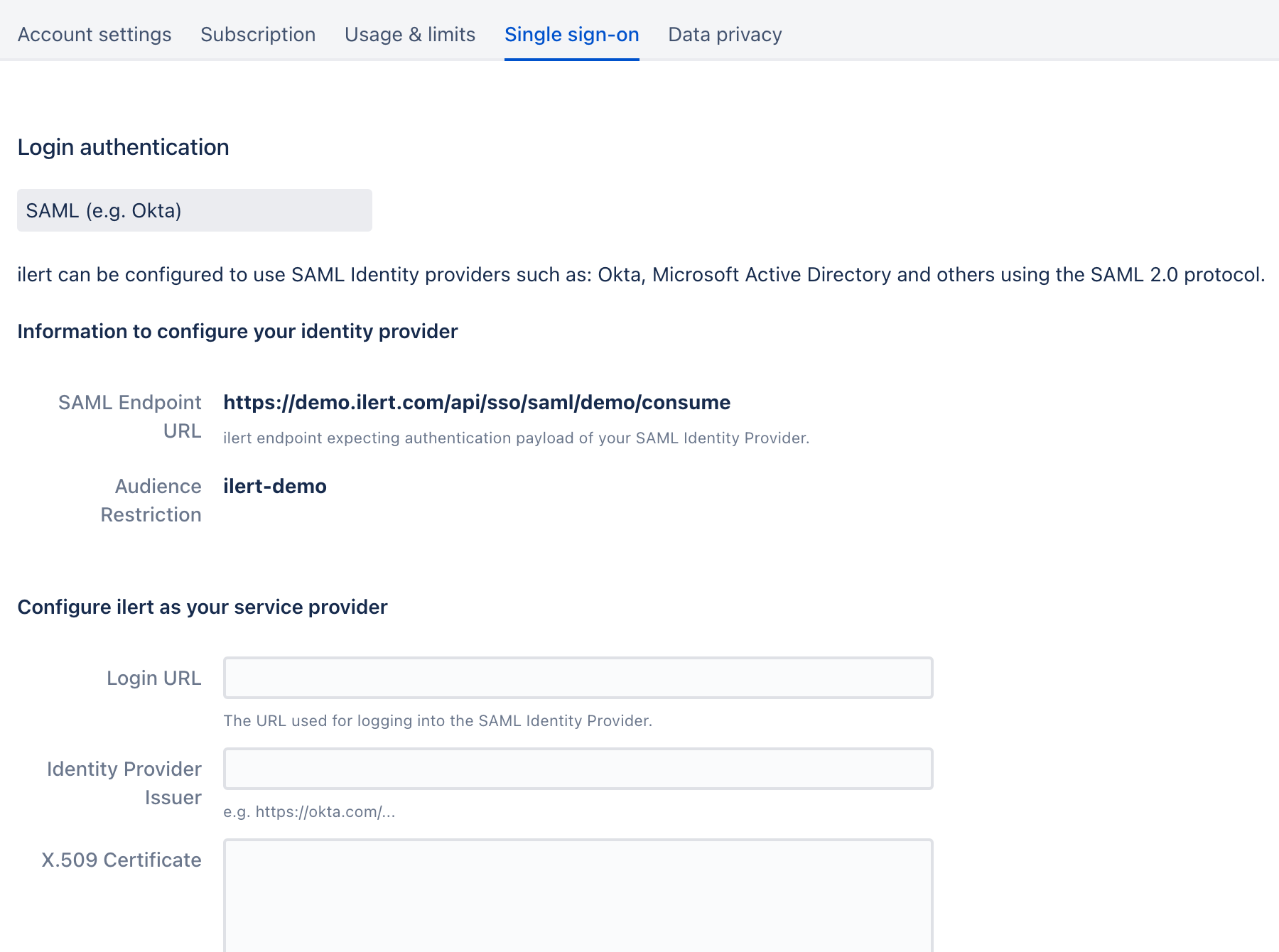
The SAML method, with the values ilert gives out above the values it expects back.
## Set it up
Follow the guide for your identity provider. Each one covers both sides of the exchange — the application in your provider, and the matching fields in ilert.
{% content-ref url="/pages/-M9bc\_oViNp1gqgAH7fH" %}
[Setting up SSO with Okta](/users-and-access-management/single-sign-on/setting-up-sso-with-okta.md)
{% endcontent-ref %}
{% content-ref url="/pages/-M9bflZkpojCyPuooF-r" %}
[Setting up SSO with Microsoft Entra ID](/users-and-access-management/single-sign-on/setting-up-sso-with-azure-active-directory.md)
{% endcontent-ref %}
{% content-ref url="/pages/-MX3r49\_UrjfHiycxfSr" %}
[Setting up SSO with Auth0](/users-and-access-management/single-sign-on/setting-up-sso-with-auth0.md)
{% endcontent-ref %}
{% content-ref url="/pages/-M9bfbs\_lLuRaD9JvvOS" %}
[Setting up SSO with Google Workspace](/users-and-access-management/single-sign-on/setting-up-sso-with-g-suite.md)
{% endcontent-ref %}
Using a provider that is not listed? Any SAML 2.0 provider works. Follow the [Okta guide](/users-and-access-management/single-sign-on/setting-up-sso-with-okta.md) for the ilert side of the setup — the three values ilert needs are the same whoever issues them.
## Settings that apply to every method
These sit below the provider fields on the **Single sign-on** tab and behave the same for SAML and Google.
| Setting | Effect |
| -------------------------------------------------------- | --------------------------------------------------------------------------------------------------------------------------------------------------------------------------------------------------------------------------------------- |
| **Allow login with username and password** | Leave it on and users can still sign in with their ilert password. Turn it off to require single sign-on for everyone except the account owner, who can still sign in to the web app with a password. |
| **Provision new users on first sso login** | Creates an ilert user the first time someone authenticates successfully, instead of requiring an admin to invite them first. See [auto provisioning](/users-and-access-management/single-sign-on/auto-provisioning-users-and-teams.md). |
| **Longer sessions (auto enable 'remember me' on login)** | Keeps users signed in longer, as though they had ticked **Keep me logged in**. |
SAML adds one more: **Compress AuthnRequests**, which deflates the authentication request before sending it. Turn it on only if your identity provider requires it.
{% hint style="warning" %}
**Turn off password login last, and test first.**
With **Allow login with username and password** off, a broken SAML configuration stops everyone signing in except the account owner, who can still use a password in the web app. Sign in through your identity provider in a private browser window and confirm it works before you clear that checkbox.
{% endhint %}
## How users sign in
Once single sign-on is configured, users take a different route into ilert:
{% stepper %}
{% step %}
### Open the ilert login page
On [app.ilert.com](https://app.ilert.com), click **Login with SSO** rather than entering a password.
{% endstep %}
{% step %}
### Enter your account's subdomain
This is the first part of your ilert URL — `acme` for `acme.ilert.com`. Anyone who has forgotten it can click **Forgot your subdomain?**, enter their email address, and click **Send account URLs** to receive it by email.
{% endstep %}
{% step %}
### Authenticate with your identity provider
ilert hands off to your provider. Once it approves the sign-in, the user lands in ilert.
{% endstep %}
{% endstepper %}
Users who reach ilert through their identity provider's app dashboard — the Okta tile, the Microsoft My Apps portal — skip all three steps.
## What single sign-on does not do
* **It does not delete or deactivate users.** Removing someone at your identity provider stops their single sign-on, and nothing else. Their ilert user stays active: it keeps its seat, its API keys, its mobile app sign-ins, its on-call shifts and escalation policy entries, and any web session already open. A web session lasts up to 14 days after sign-in, or 8 weeks with **Keep me logged in** or **Longer sessions**. While **Allow login with username and password** is on, they can also still sign in with a password: single sign-on gives users an ilert password nobody knows, but **Forgot your password?** lets them set their own. See [Offboard someone](#offboard-someone).
* **It does not synchronize groups continuously.** Roles and team membership can be set from SAML attributes, but only when the user is provisioned on first login. Later changes at the identity provider do not flow through. See [auto provisioning](/users-and-access-management/single-sign-on/auto-provisioning-users-and-teams.md).
* **It does not enforce single sign-on for the account owner.** With password login turned off, the account owner can still sign in to the web app with a password, though not to the mobile app. Signing in through single sign-on sets the owner's ilert password to one nobody knows, and sets it back whenever they sign in that way again, so an owner who uses single sign-on first sets a new password with **Forgot your password?** when they need this route. Protect the account with [two-factor authentication](/users-and-access-management/two-factor-authentication-mfa.md).
## Offboard someone
Removing a person at your identity provider is the first step, not the last. To end their access to ilert and free their seat, an admin also deletes their ilert user:
1. Take them out of every escalation policy, and make sure no pending alert still lists them as a responder. ilert refuses to delete a user in either case, and names the policies and alerts in the way.
2. Go to **Settings** → **Users** and click the **Delete** icon in their row, or open the user and choose **Delete** from the three-dot menu. Confirm with **Delete**.
Nobody can delete their own user or the account owner. To offboard the account owner, they first hand the role to another user; see [Account owner](/users-and-access-management/user-roles-and-permissions.md#account-owner).
Deleting the user removes their sign-in credentials, API keys and mobile app sign-ins, and frees the seat. It does not end web sessions they already have open, which expire on their own. To sign them out of the web app at once, change their role before you delete them: any change of role ends all of a user's web sessions.
To offboard from a script instead, delete the user through the [REST API](/developer-docs/rest-api/api-reference/users.md), or remove their `ilert_user` resource if you manage users with the [Terraform provider](https://registry.terraform.io/providers/ilert/ilert/latest/docs/resources/user).
{% content-ref url="/pages/-MUDUwi7p1W7fdZyonRf" %}
[Auto provisioning users & teams](/users-and-access-management/single-sign-on/auto-provisioning-users-and-teams.md)
{% endcontent-ref %}
---
# Agent Instructions
This documentation is published with GitBook. GitBook is the documentation platform designed so that both humans and AI agents can read, navigate, and reason over technical content effectively. Learn more at gitbook.com.
## Querying This Documentation
If you need additional information that is not directly available in this page, you can query the documentation by asking a question.
Perform an HTTP GET request on the following URL with the `ask` and `goal` query parameters:
```
GET https://docs.ilert.com/users-and-access-management/single-sign-on.md?ask=&goal=
```
`ask` is the immediate question: it should be specific, self-contained, and written in natural language.
`goal` is what the user is ultimately trying to achieve, the reason they need the answer. Sharing it helps GitBook give you a better, more relevant answer. A goal is most helpful when it describes the outcome the user wants rather than restating the question. For example, with `ask=how do I create an API token`, a goal like `automate deployments from our CI pipeline` lets GitBook tailor the answer to that use case.
The response will contain a direct answer to the question and relevant excerpts and sources from the documentation.
Use this mechanism when the answer is not explicitly present in the current page, you need clarification or additional context, or you want to retrieve related documentation sections.